 splines
scripts / norns
tiny-term
WIP - a super basic terminal emulator-ish script for norns
install
In maiden's REPL (the >> prompt at the bottom of the editor), run:
;install https://github.com/tapecanvas/tiny-termOr add the splines catalog to maiden and install it from the project manager. Restart norns if the script ships a new engine.
readme from tapecanvas/tiny-term
tiny-term
WIP - a super basic terminal emulator-ish script for norns
- inspiration: "shell" from hid-demo by @okyeron
- one step closer to making norns my ideal cyber deck
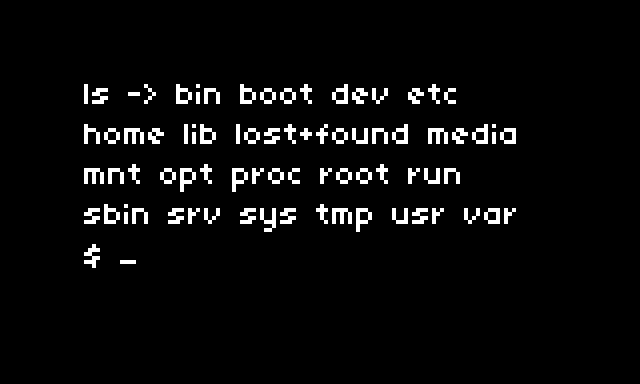
tiny-term is a simple terminal emulator-ish script for norns
the script opens with a prompt
$and blinking cursor_input from keyboard displays after the prompt
> cd home/we/dust_pressing
enterwill execute the command.the display will show the executed command and the resulting output
pwd -> /home/we/dust/audio
the display can be scrolled using e2
you can access the history using the up and down arrow keys
k2 clears the screen
there is currently very basic error handling, and no special key support
typical terminal applications will not be able to run ie: text editors, file managers, etc.
- most of these should throw an error message to prevent execution/prevent crashes, but i'm sure the blocked command list will grow with further testing
features:
- can run most shell commands that don't require user interaction and don't rely on specific terminal features.
- some you are able to run:
- File and directory operations:
ls,pwd,cd,cp,mv,rm,mkdir,rmdir, etc. - Text processing:
cat,more,less,head,tail,grep,sed,awk, etc. - System information:
date,uptime,who,uname, etc. - Network operations:
ping,netstat,curl,wget, etc. (note: if you runpingbe sure to set the count flag to oneping -c 1 8.8.8.8tiny-term can not handle outputs that build upon themselves - Process management:
ps,kill,top, etc. (note:topis a terminal-based program, but it can be used in batch mode, which doesn't require a terminal. For example,top -b -n 1runstopin batch mode and exits after one iteration.)
- File and directory operations:
- commands that you won't be able to run include terminal-based programs that require user interaction or rely on specific terminal features. Disallowed commands:
vi/vim,nano,less,more,htop,top(in interactive mode),ssh,tmux,clear, etc.
to-do:
- modifier keys
- custom help response
- left right arrow key = cursor movement
- delete key functionality
- investigate sometimes funky backspace = adds strings??
archive:
- add command history (up and down keys) - need to rethink movement keys or just use e2 for scroll
- k2 clear screen
- up arrow recall last command -- implement real command history next
- add more disallowed applications
- handle "TERM environment variable not set." lock-up
- add textwrap to command input
- scroll to top of output when command is run
- scroll to cursor when typing next command (if output is too long to show cursor on first page)
- work on output formatting
- working prototype
log:
- 2024-02-23
- first draft
- able to move around through directories, and execute basic commands
- added prompt display and cursor
- 2024-02-24
- scroll to prompt when entering a new command (helps when in a long block of output text)
- scroll to top of output after command is run (no longer have to scroll to beginning)
- tried to find a way around getting terminal-based apps (ie: vi, top, less, etc) to work, but options are sliiiim
- lua has a luaposix library, but not sure if its worth the hassle.
- screen / format tweaks
- 2024-02-27
- added "disallowed_commands" - terminal apps that require a proper terminal environment to work. solved lockup issue when one of these tried to run.
- worked on cursor positioning - still needs some tweaking though
- added up arrow to recall last ran command - extend to proper command history next
- added clear screen key k2
- 2024-02-28
- got command history mostly worked out