 splines
← all scripts / norns
shoal new
Four-track generative melody sequencer for norns, adapted from Ormer Modular's Shoal
install
In maiden's REPL (the >> prompt at the bottom of the editor), run:
;install https://github.com/giovannilami/shoalOr add the splines catalog to maiden and install it from the project manager. Restart norns if the script ships a new engine.
readme from giovannilami/shoal
shoal
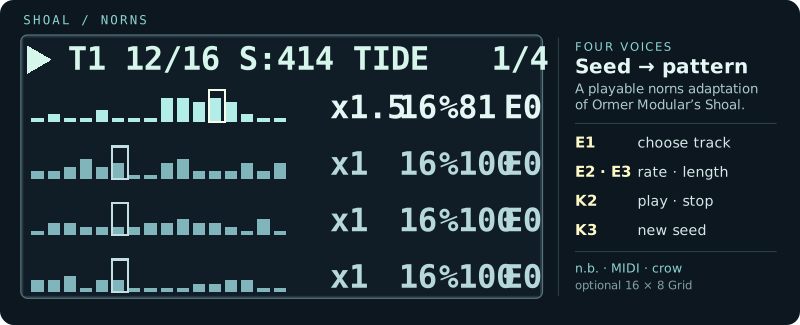
Four generative melodies for norns, with an optional 16 × 8 Grid performance editor. Each track grows a repeatable pattern from a seed, then lets you reshape how it moves, changes and sounds. The norns screen shows all four complete patterns and their moving playheads; Grid is for hands-on parameter changes, not a second step sequencer.
Credit first: Shoal for the disting NT, the original idea, musical algorithm, name and design, is by Ormer Modular. This is an unofficial norns adaptation, not an Ormer Modular release. The Lua musical core ports parts of their MIT-licensed C++ source; their copyright and licence are retained in THIRD_PARTY_NOTICES.md. The norns adaptation, interface and routing are maintained by @giovannilami.
This is a community beta. PolyPerc, MIDI, n.b., Grid interaction, the basic LFO controls and pset save/recall have been exercised on a real norns. Long sessions, extreme rates and some output edge cases still need testing; see Known differences.
Start playing
- Download this repository to your computer. For norns, make a
shoalfolder in/home/we/dust/code/containingshoal.lua, the completelib/directory (includingshoal_mod.lua),LICENSEandTHIRD_PARTY_NOTICES.md. Leavedocs/andtest/on your computer; norns does not need them to run Shoal. If an oldershoal-nornsinstallation exists, first move it out ofdust/code; do not merge versions or leave both scripts in SELECT. - Select SHOAL on norns. Track 1 plays the built-in PolyPerc engine immediately; Tracks 2–4 start with Output Off until you assign them.
- Turn E1 to select a track. Turn E2 for Rate and E3 for Length. Press K3 to arm a new seed; it lands at the next loop start. K2 stops or starts playback.
- In PARAMETERS → EDIT → TRACK 1–4, choose an Output: PolyPerc, n.b., MIDI or crow. The Grid is optional.
If the script does not appear in SELECT after copying it, restart norns. Development checks live in test/ (singular), which norns excludes from SELECT; an old tests/ (plural) directory can appear as extra scripts. Do not put a ZIP inside dust/code/shoal; extract it on your computer first. A SUPERCOLLIDER FAIL accompanied by Structure needs cleaning or ext4 errors indicates a filesystem problem, not a Shoal Lua error; stop and check the microSD before retrying. See the publishing checklist for the remaining release steps.
The new script name uses a new norns data directory. Keep a backup of /home/we/dust/data/shoal-norns/ if you have old psets; they are not moved automatically by renaming the script. The internal parameter IDs are unchanged so existing psets can be migrated separately after testing.
The norns screen
The overview is deliberately a whole-pattern view: each row shows every step of that track, whether its Length is 4, 16 or 64. A brighter outline follows the last visited step; short bars represent rests and taller bars suggest note height. The selected track is brighter.
The top line reports the selected track, its current position/length, seed, Follow source when present and Direction. The seed is always 0–999; S:419 means seed 419, not 5,419. The four values to the right of each pattern are always Rate · Length · Chance · Evolve. The picture above is an explanatory drawing, not a screenshot of a running seed.
Tide follows the original Shoal behavior: after each complete pass, pitches move one step against a fixed rhythm. Chance rests and Tie positions stay put, so bar heights can change at the same screen positions without a new seed. The rotation is non-destructive: with Evolve off, it realigns after Length passes, and switching to Forwards reads the original unrotated melody. See the original Shoal manual.
| On norns | Action |
|---|---|
| E1 | Select track 1–4 on any page |
| E2 / E3 on page 1 | Rate / Length of selected track |
| Hold K1 + E2 / E3 on page 1 | Chance / Evolve |
| K2 / K3 | Play–stop / reseed selected track |
| Hold K1 + K3 / K2 | Next / previous screen page |
| E2 / E3 on pages 2–4 | Choose field / edit value |
Page 1/4 is the performance overview. Page 2/4 edits Seed, Direction, Shift, Follow, Breathe, Gate, Tie and Mute. Page 3/4 edits Note/Oct variation, Octave, Transpose, Min/Max note and Spread. Page 4/4 contains Scale, Root, Weight, Freeze and output settings. The full parameter menu remains available under PARAMETERS → EDIT; n.b. voice-specific sound controls live there too.
Optional 16 × 8 Grid
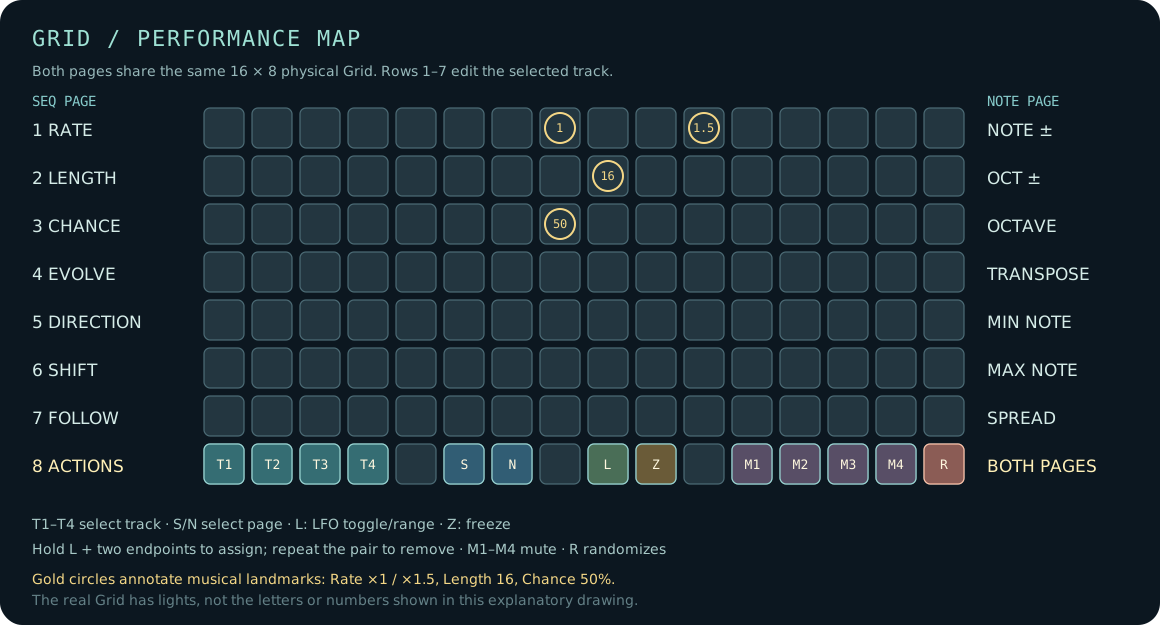
The Grid has two pages, SEQ and NOTE, independent of the four norns screen pages. Rows 1–7 set one parameter each. The last row always selects tracks and pages or performs an immediate action.
| Row | SEQ | NOTE |
|---|---|---|
| 1 | Rate | Note variation |
| 2 | Length | Octave variation |
| 3 | Chance | Octave offset |
| 4 | Evolve | Transpose |
| 5 | Direction | Minimum MIDI note |
| 6 | Shift | Maximum MIDI note |
| 7 | Follow | Spread |
| 8 | T1–T4 · SEQ/NOTE · LFO · Freeze · Mutes · Random | Same actions |
Tap a row to choose one of its discrete values. Important landmarks: Rate ×1 and Chance 50% share column 8; Rate ×1.5 is column 11; Length 16 is column 9. Row 8, column 9 controls the LFO. Use the norns encoders or parameter menu for exact values between Grid choices. Row 8, column 16 randomizes all 14 Grid-editable parameters of the selected track, across both Grid pages. It chooses values reachable from Grid keys, with two performance-friendly limits: Rate stays between /4 and ×4, and Chance is at least 5%. You can still set slower/faster rates or Chance 0% manually. Random does not alter Seed, Mute, Freeze or playback. K2 on norns remains Play/Stop.
The Grid intentionally does not duplicate the asynchronous sequencer display. For exact value ladders and the meaning of each control, see the detailed guide.
Clock-synced LFOs
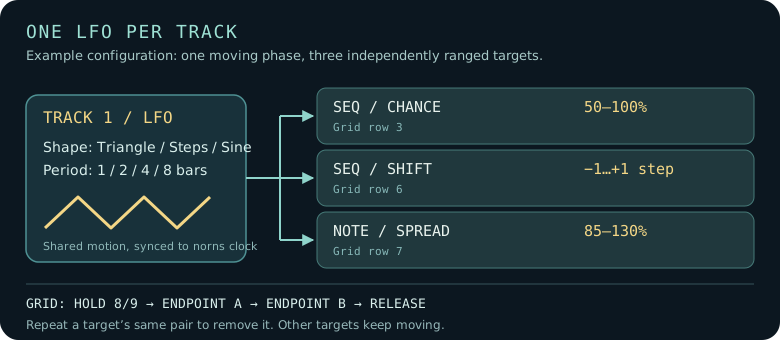
There is one LFO per track. In PARAMETERS → EDIT → LFO T1–T4, switch it on, choose Triangle, Random steps, or Sine, and choose a cycle of 1, 2, 4 or 8 bars. Then switch on any combination of Rate, Length, Chance, Shift, Note ±, Oct ± and Spread. They share the same movement, but each has its own range. Triangle goes low → high → low; Random steps holds one deterministic value for each full cycle; Sine moves smoothly through the range before snapping to available Grid values.
On Grid, tap row 8, column 9 to turn the selected track's LFO on or off. To set one target's range, hold 8/9, press its row at the first endpoint, press the same row at the second endpoint, then release 8/9. This also assigns that target to the LFO. You can set several rows in one hold; while still holding 8/9, press 8/6 or 8/7 to change Grid page and add targets there too. Alternatively, release 8/9 and hold it again for the next parameter; this does not switch the LFO off once you have touched a row. For example, on SEQ, hold 8/9 and press 8/3 then 16/3 to vary Chance from 50% to 100%. On NOTE, use row 7 for Spread. Lit endpoints bracket the moving bright value. To remove just that assignment, repeat the same two endpoints while holding 8/9 (either order); the other LFO targets keep running. The same target can also be switched Off in its LFO Tn menu. Column 5 of the bottom row is again an empty separator.
The menu and pset retain the manual/base values; the LFO only changes what plays. Turning the LFO or a target off restores its base value. Rate changes at beat boundaries without restarting the playhead; Length changes at the beginning of the next phrase, not halfway through one. Basic Grid/LFO operation has been tested on a real norns; extended sessions, very high rates, dynamic Length in non-linear Directions and recall of LFO ranges from psets still need hardware checks. The detailed guide has the full behavior and examples.
Sound and connections
| Output | What you need |
|---|---|
| PolyPerc | Built in; Track 1's default. A simple percussive sound for first launch. |
| MIDI | Set the global MIDI port to the virtual device slot in SYSTEM → DEVICES → MIDI, then set each track's MIDI channel. |
| crow | Use outputs 1/2 or 3/4 as pitch/gate pairs; 0 V is MIDI note 48 (C3), 1 V/octave. |
| n.b. | An installed n.b.-compatible player (via nbout or standalone nb). Assign a different voice per track if you like; edit the selected voice's sound under N.B. SOUND in PARAMETERS → EDIT. |
Each track routes independently. Shoal itself needs no custom SuperCollider engine; an n.b. voice may use its own sound engine. PolyPerc is available as the built-in first-play sound. MIDI and n.b. were tested by the port's user; crow remains a route to verify on hardware.
Saving and recalling
Use norns' usual PARAMETERS → PSET menu. Psets save the script parameters, including seeds, routing, Grid-edited values and LFO settings/ranges. Saving and recalling a pset was tested on hardware before the LFO feature; recall of the new LFO ranges still needs a hardware check. Psets from an earlier development build with all 29 NT Rate options should have their Rate values checked: this norns build exposes /32 through ×32, not /64 or ×64, so old option numbers can refer to a neighbouring rate.
Known differences and limits
- The reference core preserves Shoal's eight-track, 29-rate tables for source comparison. The playable norns instrument uses four tracks and 27 selectable rates (
/32to×32). - Shift is an offset in steps, not a pitch transpose. The Grid offers selected values up to ±12; the norns parameter menu offers the full ±63. Use Transpose or Octave for pitch changes.
- Min/Max note and Spread are norns-only output-pitch controls. They do not change the seed or the reference musical core.
- NT-specific Current CV, Slop timing and exact gate/EOS pulse behavior are not implemented here. Tie handling, very high rates and crow timing need more hardware testing. PolyPerc is percussive, so Freeze cannot sustain it like a held MIDI or n.b. note.
- This is a port and adaptation, not a byte-for-byte reproduction of every NT output or interface feature.
See detailed behavior, fidelity notes and test instructions before reporting an equivalence issue.
Credits and licence
Original Shoal: Ormer Modular, for the Expert Sleepers disting NT. Their original manual is the primary reference. norns adaptation: @giovannilami, with its own interface and output routing. The original author deserves the primary credit for the musical concept and algorithm.
The norns-specific code is offered under the MIT licence; the original Ormer Modular MIT notice is reproduced in THIRD_PARTY_NOTICES.md. Contributions and bug reports are welcome once the public repository and lines thread exist. This project is not affiliated with or endorsed by Ormer Modular, Expert Sleepers or monome.
discussion
Like this script? React with 👍 or ❤️ below (needs a GitHub account). Reactions count as likes (♥) on splines, updated daily.