 splines
scripts / norns
samthree
3 voice looper based on samsara
install
In maiden's REPL (the >> prompt at the bottom of the editor), run:
;install https://github.com/laderast/samthreeOr add the splines catalog to maiden and install it from the project manager. Restart norns if the script ships a new engine.
readme from laderast/samthree
Samthree Audio Looper
Note: pause/resume now working
Video here: https://youtu.be/c6nqTYF_J-k
Note: original code forked from https://github.com/21echoes/samsara - I have retained the bits of doc that are still relevant.
The original samsara code is a clock synced looper for Norns. I have heavily adapted it to use three voices that playback the original recorded and sync'ed loop. The result lets you make some complex sounds with very simple loops.
- Voice 1+2: Original 1x (stereo) loop
- Voice 3: 1/2 speed reversed (mono) loop
- Voice 4: 2x speed shuffled (mono) loop
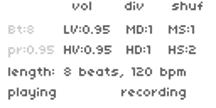
I have added a new UI and controls for these three voices. These use Encoder 1 to switch between parameters
- E1: Move tab in menu
playtab:- E2: Number of Beats (identical to Samsara)
- E3: Pre Level (identical to Samsara)
voltab:- E2: Low loop volume (0-1.0)
- E3: High loop volume (0-1.0)
divtab:- E2: 1x loop clock divisor (1-8)
- E3: 2x loop clock divisor (1-8)
shuftab:- E2: Shuffle 1x loop (1 normal, 2 = play slices in random order)
- E3: Shuffle 2x loop (1 normal, 2 = play slices in random order)
Note: I have retained all of the key combos from Samasara. I only changed the encoder settings (see above)
- K2: Start/pause playback
- K3: Arm/disarm recording
- Hold K2+tap K3: Tap tempo
- Hold K1+tap K2: Double buffer
- Hold K1+tap K3: Clear buffer
Thank you very much to 21echoes for their Samsara code. This was an excellent base to learn softcut and to learn the ui and params modules.
Installing
Should be available to install using the community library soon.
Manually install by using the following command at the Matron prompt:
;install https://github.com/laderast/samthree