 splines
← all scripts / norns
rotae_versantur new
A four-track recorder for Monome Norns+Arc. The wheels turn.
install
In maiden's REPL (the >> prompt at the bottom of the editor), run:
;install https://github.com/awwaiid/rotae_versanturOr add the splines catalog to maiden and install it from the project manager. Restart norns if the script ships a new engine.
readme from awwaiid/rotae_versantur
Rotae Versantur
The wheels turn
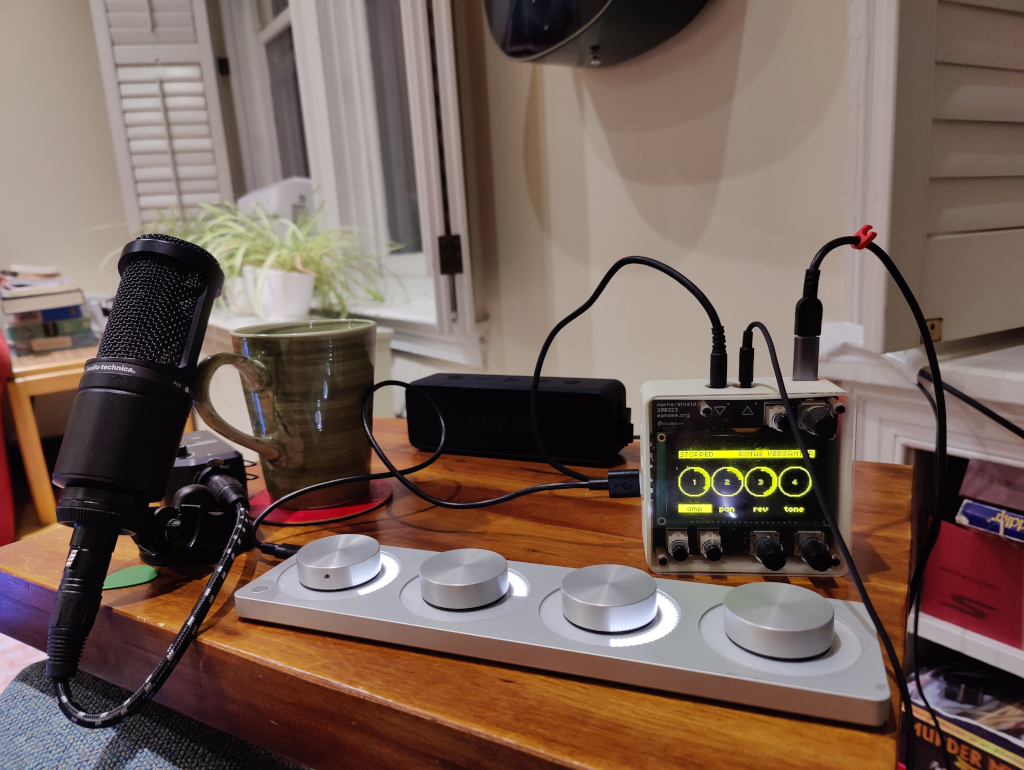
A four-track recorder. This is a Norns script and engine optimized for the Monome Arc, though with a bit more tweaks it could be used with only a Norns.
Share your thought and ideas on the Lines (llllllll.co) forum post!
General Concept
Each wheel (knob) on the Arc represents a track. The Arc button toggles between playing (or recording), stopping when pressed and released. If you press the button and turn a wheel you get further actions.
- Wheel = Apply the current mode (amp, pan, reverb, tone) to the track
- Button + Wheel 1 = Seek (all tracks are synced)
- Button + Wheel 2 = Change modes
- Button + Wheel 3 = Select track for recording
- Button + Wheel 4 = Select tracks for bouncing
Workflow / Tutorial
All tracks start out empty
Record to track 1
- Hold down the button and turn Wheel 3 to select track 1 for recording
- Press and release the button to start recording from your microphone
- Make some noise!
- Press and release the button to stop recording
Record to track 2 while playing track 1
- Hold down the button and turn Wheel 3 to select track 2 for recording
- Press and release the button to start recording from your microphone
- You are now listening to Track 1 and recording to track 2
- Press and release the button to stop recording
Play back and adjust
- Press and release the button to start playback
- Turn Wheel 1 and Wheel 2 to adjust amp (volume)
- Hold down the button and turn wheel 2 until reverb (wheel 3) is lit
- Turn Wheel 1 and Wheel 2 to adjust reverb
- Hold down the button and turn wheel 2 until amp (wheel 1) is lit
- Turn Wheel 1 and Wheel 2 to adjust amp (volume) a bit more
- Press and release the button to stop playback
- Hold the button and turn Wheel 1 to seek back to the beginning
Combine track 1 and track 2 onto track 3
- Hold the button and turn Wheel 4 (bounce) until track 1 and track 2 are selected
- Hold the button and turn Wheel 3 (record) until track 3 is selected
- Hold the button and turn Wheel 1 (seek) until you are at the beginning
- Press and release the button to record
- The microphone AND track 1 AND track 2 will be recorded to track 3
- Press and release the button to stop recording
- Now you can record over track 1 and track 2
discussion
Like this script? React with 👍 or ❤️ below (needs a GitHub account). Reactions count as likes (♥) on splines, updated daily.