 splines
← all scripts / norns
princeton new
Amp sim based on a combo. Tuner, effects and looper.
install
In maiden's REPL (the >> prompt at the bottom of the editor), run:
;install https://github.com/notrobintaylor/princetonOr add the splines catalog to maiden and install it from the project manager. Restart norns if the script ships a new engine.
readme from notrobintaylor/princeton
princeton
A guitar amp simulator, pedalboard and looper for Monome Norns
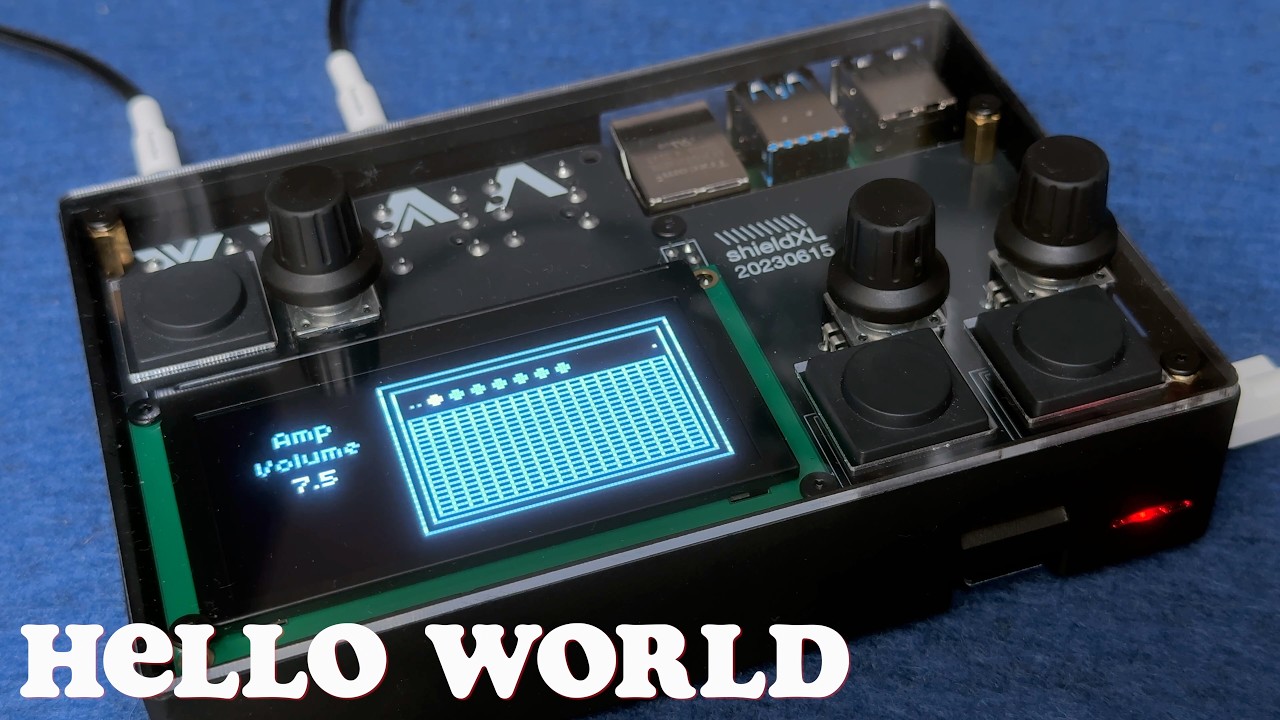
princeton is a guitar amp, pedalboard, and looper for Monome Norns. The amp sits in the middle: a small American combo from the early 1960s, recreated in code. Around it, four pedals before the input, bias tremolo and spring reverb after, and a 60-second stereo looper riding between them. What you loop washes through the same reverb as the live signal.
Plug a guitar into the left input. No preamp or interface required.
The looper carries the script. Six storage media (BBD, Cassette, CD, Chip, Tape, Vinyl) colour the loop. Imprint sets how much of that colour gets baked in the moment you record; Wear sets how much further the loop erodes on every pass. Four playback modes (Overdub, Overwrite, Sample, Resample) and four direction modes (Forward, Reverse, Pendulum, Random) sit underneath. Tremolo and reverb stay on. The amp stays clean unless you push it past Volume 5.5. For harder distortion, reach for Push or Distort up the chain.
What it does
Loop. A 60-second stereo buffer between tremolo and reverb, so anything you record sits in the same spring tank as the live string. Medium picks the storage type the loop pretends to be: BBD darkens and saturates, Cassette wobbles and crinkles, CD plays clean until it skips and stutters, Chip quantises and aliases like an early sampler, Tape softens and drifts, Vinyl crackles and wobbles over a gentle high-frequency rolloff. Imprint controls how strongly the medium colours the signal as it lands in the buffer (the first repeat already sounds like the medium). Wear controls how much further the medium erodes the loop on every subsequent pass; at 0 the loop is stable, at higher values it ages over time. Direction can run forward, reverse, pendulum, or random. Mode covers Overdub (layer), Overwrite (replace), Sample (one-shot, K2 retriggers), and Resample (record the loop output back into the buffer, including its own ageing). Speed transposes by an octave in either direction in Steps mode, or sweeps continuously in Smooth mode. The looper keeps running while you open the tuner or pedalboard.
Cut. An optional noise gate at the very front of the chain, before the pedals, bypassed by default. Classic noise suppression between notes, but the wide parameter ranges also make it a creative tool: a long Attack turns it into a slow-gear swell that fades in every note, a fast Attack and Release with a short Hold give percussive chopping, and a partial Range ducks quiet passages instead of silencing them. Because every gate parameter is a modulation target, an LFO on Threshold synced to the clock turns it into a rhythmic, tremolo-style gate. Detection runs in Peak mode for a snappy response or RMS for a smoother contour, and Margin (a hysteresis control) sets how far the signal has to fall back below Threshold before the gate closes.
Pedalboard. Four effects sit between the input and the amp, paired by character: Push and Distort handle gain, Warp and Repeat handle modulation. Each is independently bypassable. Open the pedalboard view from any other view with K2 (gain pair) or K3 (modulation pair) held; the active pair's label brightens.
Amp. A small American combo from the early 1960s. Volume below 3.5 stays clean; past 5.5 it begins to break up, so single-coils clip lightly at the default when you dig in. Bass and Treble at 5 give the open Fender voice; below 3 they cut. The mid-scoop in the tone stack is fixed.
Tremolo. Bias-style amplitude modulation, always available at the output of the amp. Intensity defaults to 0, so nothing is happening until you turn it up. Up to 15 % the dry signal fades while the tremolo blends in; past 15 % it's pure tremolo with rising depth. Peaks stay at full amplitude. Speed defaults to 2.5 Hz and can sync to the Norns clock.
Hold. Two granular momentary freezes in parallel, sitting between Tremolo and Loop and capturing the fully amped, post-tremolo tone. The pads feed the looper as well, so recording or overdubbing while a pad is held prints it into the loop; a loop that is only playing leaves it out. Switch one to Active and it grabs the last second or so you played and sustains it as a granular pad while the live signal keeps passing through underneath, so you can play over the held sound. Gain drives the pad into a soft saturation for body, Level sets its place in the mix, Size sets grain length, Density how thickly the grains overlap, Spread scatters their onsets in time, and Shape swaps the grain window for a softer, swelling, plucked or flatter character. Pitch transposes the pad by up to two octaves either way, and Pitch Mix decides how much of it is shifted. The pad fades in over Rise and out over Fall; re-engaging during a Fall crossfades the old freeze into the new one. Run both instances at once, with different Size, Shape or Pitch, to layer two complementary freezes.
Spring reverb. Applied to the full stereo mix, live signal and loop together. Amount sets both send level and decay; Length adjusts decay independently if you want longer wash without more signal in the tank. Low Shelf and High Shelf colour the wet path. At 25 % Amount the spring tank sits behind the signal; turn it up for the long shimmer.
Cab & Mic. A 10" Jensen-style cabinet model with three mic positions (Center, Middle, Edge). Or bypass cabinet processing entirely for a raw DI tone or to feed an external cab.
Limit. A gentle output compander after the cabinet, active by default. It leaves a clean amp alone and only steps in when a drive, a high Volume or the looper pushes the level up, so switching sounds does not throw the output around.
Output. Stereo throughout the post-amp section. Tremolo alternates between L and R (the classic bias-trem ping-pong). The spring reverb outputs a stereo pair via its allpass diffuser. Both Norns sends carry the full stereo signal, so princeton works as a stereo source in any fx_mod slot.
Bypass. Every stage can be bypassed independently: cut, pedals, amp, tremolo, hold 1, hold 2, loop, reverb, cabinet, limit. The amp bypass also dims the panel lamp on screen; the others are toggled from PARAMS or via MIDI.
Count. A click track running independently of the signal path. Tempo, level, click length and chromatic pitch (Root plus Register) are set from PARAMS, and a Scale, Chords and Scale Play turn it into a small playable voice that climbs, harmonises and sequences off the same clock. Division locks the click to the Norns clock when one is running, or free-runs at the BPM field when the clock is stopped.
Mod Rack. Eight LFOs with six waveforms (Sine, Triangle, Saw, Square, Smooth Random, Stepped Random) that modulate any continuous parameter in the signal chain. Rate runs from 0.1 to 25 Hz with optional sync to the Norns clock. Each LFO has its own Depth, Direction (positive, negative, or bipolar), Rate Slew, Sync division and Sync Feel. Stepped Random is a shift-register pattern generator: Steps sets the register length (1–16 bits) and Stability controls the probability of feeding back the MSB versus its complement, producing anything from a regular clock to dense noise. LFOs can target other LFO rates and depths, creating compound motion. Modulation targets span Cut, all pedal parameters, amp, tremolo speed and sync, hold 1 and hold 2, reverb, looper levels, looper speed, looper quantization division, the metronome voice (division, root, register, scale, chords and scale-play mode), and other LFO rates and depths. Each target can be owned by at most one modulation source at a time; the ownership model prevents interference between sources on the same target, and is shared with Sense. The Mod Rack opens over either view on a 2-second K1 hold: one pair shows the two Sense modules, the next four pairs show the LFOs, one pair shows the two Walk step sequencers, and the last two pairs show four Triggers. Tune and Count left the rack in v2.0 and sit at the head of the signal chain instead.
Walk. Two sixteen-step sequencers alongside the LFOs. Each steps through up to sixteen values (2–16 selectable) at its own Rate or locked to the Norns clock, driving any continuous parameter. Every step is a bipolar amount from −100 % to +100 % relative to the target's base value: 0 % is no change, +100 % reaches the parameter's maximum, −100 % its minimum. Rate Slew glides between steps, Randomize rolls fresh values, and the pane shows a running light on the playing step. Walks share the same ownership pool as the LFOs and Sense modules and can modulate each other.
Sense. Two envelope followers that track the amplitude of the raw input signal (pre-pedals) and modulate a chosen continuous parameter in proportion. Depth scales the contribution, Direction picks upward or downward modulation, Slew sets the attack and release time of the detector. The ownership pool is shared with the Mod Rack: a parameter can be claimed by an LFO or by a Sense module, never both at once. Each Sense pane shows a live amplitude visualizer with a horizontal centerline; a bar fills upward or downward depending on Direction. Useful for input-driven dynamics: a soft attack opens up Distort Tone, a louder pick attack pulls down Reverb Amount, and so on.
Triggers. Four event triggers ride alongside the LFOs in the Mod Rack. Each fires at a chosen rate (free in Hz or synced to the Norns clock) with a probability gate, and dispatches a single action per fire. Targets cover device bypass toggles (Cut, Fray, Push, Distort, Warp, Repeat, Amp, Tremolo, Hold 1, Hold 2, Reverb, EQ, Limit), per-LFO randomize triggers (active when the destination LFO is in Stepped Random), and two looper transport actions (Rec walks K3 order, Clear empties the buffer). Every trigger ships with no target (-) and disabled, so nothing fires until you pick an action and enable one with K3.
Signal flow
                                    mono through pedals and amp
                                    ───────────────────────────

  guitar IN L ──► Cut ──► Fray ──► Push ──► Distort ──► Warp ──► Repeat
                                                          │
                                                          ▼
                                                         Amp
                                                          │
                                     ───────────── stereo from here ─────────────
                                                          │
                                                          ▼
                                                       Tremolo
                                                          │
                                                          ▼
                                                     Hold 1 + 2
                                                          │
                                                          ▼
                                                        Loop
                                                          │
                                                          ▼
                                                    Spring reverb
                                                          │
                                                          ▼
                                                      Cab & Mic
                                                          │
                                                          ▼
                                                     Master gain
                                                          │
                                                          ▼
                                                          EQ
                                                          │
                                                          ▼
                                                        Limit
                                                          │
                                                          ▼
                                                        OUT L/R

  Send A and Send B each tap one of three points, scaled by its own level:
    Input   the post-pedal signal feeding the amp (after Cut, Fray, Push, Distort)
    Loop    the looper output on its own
    Output  the full stereo mix at OUT L/R
GUI modes
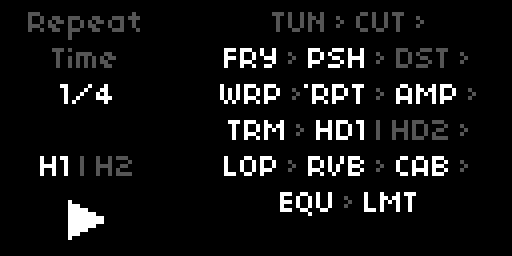
The GUI parameter (first in PARAMS) sets how the screen behaves; it changes nothing in the audio path.
- Studio (default) is the full interface described in this section: each device is drawn as its own pedal, cabinet or rack unit, and E1 walks the signal chain from end to end. Opens on the Amp.
- Stage is a single-screen performance overview. The right side shows the whole chain as centred lines of three-letter abbreviations joined by arrows, with a divider between the two parallel Holds. A device's letters are bright while it is active and dim while bypassed, and a dot above the first letter marks the selected one. The left strip is the readout used everywhere (device, parameter, value), with the loop transport icon and the H1 | H2 status below it. Opens on Tune.
- Off blanks the screen and ignores the keys and encoders, for playing in the dark. Switch back from PARAMS or MIDI.
Controls
Studio and Stage share the same four controls. E1 always walks the signal chain, E2 always picks a parameter of the focused device, E3 always changes it.
| Control | Function |
|---|---|
| E1 | Move through the signal chain, device by device |
| E2 | Select a parameter of the focused device |
| E3 | Change its value |
| K1 hold 2s | Mod Rack on / off, from either view |
| K2 | Loop: stop → clear, while Amp or Loop is focused; tap tempo on Warp and Repeat |
| K3 | Toggle the focused device on or off |
E1 runs through every device in signal order: Tune, Count, Cut, Fray, Push, Distort, Warp, Repeat, Amp, Tremolo, Hold 1, Hold 2, Loop, Reverb, Cab & Mic, EQ, Limit. The views are only the frame around them, which is why the cabinet is entered twice: once for Amp and Tremolo, and again after Hold and Loop for Reverb and Cab & Mic. Devices that share a view appear together: Tune beside Count, Cut beside Fray, the pedals in pairs, Hold 1 beside Hold 2, and EQ above Limit as two stacked rack units. Entering a device lands on its first parameter, or on the one you left it on. E2 reaches every parameter a device owns, including those the cabinet has no knob for: Tremolo's Sync and Feel, Reverb's Low and High Shelf, and Cab Level. Those show in the left readout while the panel highlight stays on the device's last real knob.
The Stage chain shows the same order minus Count, which produces no sound of its own and sits outside the audio path.
K3 toggles whatever is focused, so a bypass is always one press away. Amp and Loop are the exception: there K2 and K3 keep the loop transport, K3 stepping record → play → dub and K2 stopping then clearing. That way a loop can be punched in and out without leaving the amp. On Tune, K3 switches the mute. On Warp and Repeat, K2 taps the tempo (see Tap tempo).
K1 held for two seconds opens the Mod Rack over either view and closes it again; it is the only remaining hold. Inside the rack, E1 moves between panes: Sense 1 and 2, then LFO 1/2, 3/4, 5/6 and 7/8, then Walk 1 and 2, then Trigger 1/2 and 3/4. E2 scrolls the parameter strip of the focused half, E3 changes the value. A short K2 randomises the focused LFO's Stepped Random register, or rolls fresh values into a Walk's steps. A short K3 toggles the focused module. Tune and Count are not in the rack; they sit at the head of the signal chain instead.
Tune
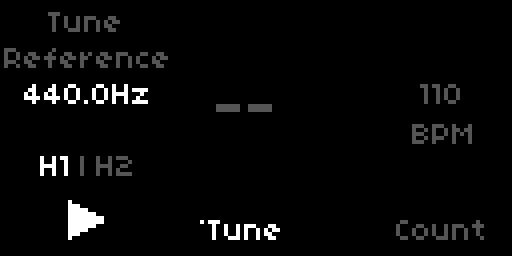
Tune sits at the head of the signal chain: walk E1 to the far left of the chain and it occupies the left half of the pane, beside Count. The note name and octave appear at large size. An arrow points flat or sharp; a dot means in tune. Press K3 to mute the output while tuning. The mute is a real parameter now, so it stays engaged until you press K3 again, and the Tune block stays lit as the reminder. The looper keeps playing under the mute, so a tuning pause doesn't break the loop.
Turn E3 while the tuner is open to adjust the reference pitch (420 to 460 Hz). The setting is saved with your PSET.
princeton's tuner runs its own pitch detector inside the engine on a boosted, band-limited copy of the input. Passive electric guitars sit too low for the Norns built-in pitch poll to track reliably; the in-engine version stays locked through string decay.
Parameters
Parameters are listed in PARAMS menu order.
Signal Flow
| Parameter | Default | Range / Options |
|---|---|---|
| Input | Mono | Mono / Stereo |
| Input Trim | 0 dB | -75 to +10 dB |
| Send A Source | Output | Input / Loop / Output |
| Send A Level | 0 dB | -60 to +10 dB |
| Send B Source | Output | Input / Loop / Output |
| Send B Level | 0 dB | -60 to +10 dB |
Mono uses the left input only at instrument level. This is the default, designed for a guitar plugged into the L jack. Stereo opens both inputs at line level (about 10 dB lower) and routes a symmetric stereo path through Push, Distort, Warp, Repeat, and the amp. The tremolo's left/right pingpong, the looper's stereo buffer, and the reverb stay unchanged in either mode.
Input Trim scales the signal as it enters the chain, before every pedal and the amp. It sits at instrument level by default (0 dB) and runs from -75 dB (near silence) to +10 dB. Being a plain control, it maps to a MIDI CC in the usual PARAMS way, so a MIDI expression pedal on Input Trim becomes a volume pedal in front of the whole chain. The tuner reads the raw input ahead of the trim, so tuning still works with the trim pulled all the way down; the Sense envelope followers and the metronome click are unaffected for the same reason.
The two pixels on the amp panel reflect the active inputs. The left pixel always lights; the right pixel lights only in Stereo.
Send A and Send B route to the two Norns send buses, which a compatible fx mod can read in its send a or send b slot. Each send picks its source independently: Input is the post-pedal signal feeding the amp, Looper is the looper output on its own, and Output is the full mix at OUT L/R. Level scales the send from -60 dB (effectively off) up to +10 dB. With both sends at their defaults (Output, 0 dB) each carries the full output at unity, the same as before the sources became selectable.
fx mod. The sends reach an fx mod through its send buses ~sendA and ~sendB. The mod is optional, and princeton adapts to whichever version is installed, no patch needed. Without the mod both sends simply rest while everything else works as usual. If a send bus of the mod lands on the Norns input or output (older versions of the mod put ~sendA on the input bus), princeton gives that send a free bus of its own and points the mod's plugins there while princeton runs; on exit it hands the mod its original bus back. What princeton found is written to the SuperCollider log in maiden at every start, one line per send.
Available from PARAMS or MAP. Not surfaced in the encoder strip.
Tune
| Parameter | Default | Range |
|---|---|---|
| Engage | Bypass | Bypass / Active |
| Reference | 440.0 Hz | 420–460 Hz |
Engage is the tuner mute: Active silences the output so you can tune quietly, Bypass lets the guitar through. It behaves like the footswitch on a tuner pedal, so it stays where you put it when you move to another device, and the Tune block lights up while it is engaged. Being a plain parameter it maps to a MIDI CC in the usual PARAMS way, which turns a footswitch into a mute. K3 toggles the same switch while Tune is in focus.
Reference is adjustable with E3 while the tuner is open. Saved with your PSET.
Count
| Parameter | Default | Range / Options |
|---|---|---|
| Engage | Off | Off / On |
| BPM | 120 | 20–300 |
| Division | 1/4 | 1/1 / 1/2 / 1/4 / 1/8 / 1/16 |
| Level | 5.0 | 0–10 |
| Root | C | C / C# / D / D# / E / F / F# / G / G# / A / A# / B |
| Register | 3 | 0 / 1 / 2 / 3 / 4 / 5 / 6 / 7 |
| Length | 50 ms | 1–500 ms |
| Scale | Off | Off / Chromatic / Major / Minor / Dorian / Pent Maj / Pent Min / Blues |
| Chords | Off | Off / Octaves / Power Chords / Triads |
| Scale Play | Off | Off / Forward / Reverse / Interval (Thirds / Fourths / Fifths / Sevenths) / Random |
| Position | Parallel | Parallel / Inline |
The click fires as a short sine-wave burst; pitch shifts relative to A4 (440 Hz) in semitones. Root picks the chromatic note name and Register the octave (0 to 7), together covering C0 to B7; the defaults give C3. Level and Length set the click's loudness and decay, short values giving a tight transient and longer ones a tone burst. All entries live in the PARAMS menu and are MIDI-mappable.
Position controls where the click enters the signal chain. Parallel sends it straight to the output, bypassing all engine processing. Inline routes it through the full chain (Pedals, Amp, Tremolo, Looper, Reverb, Cab), so the click takes on whatever is dialled in; a click that fires during a looper recording lands in the buffer.
The next three parameters turn the metro from a click into a small voice. They build on each other and all run off the same clock.
Scale picks the scale the voice uses. At Off (the default) only the Root note plays, exactly like a plain metronome. Any other scale (Chromatic, Major, Minor, Dorian, Pentatonic Major or Minor, Blues) is rooted at the current Root and becomes the pool for Chords and Scale Play. Scale also snaps Mod Rack root-note modulation: an LFO targeting Count: Root lands on scale tones rather than chromatic steps. Direct edits to Root and Register are never quantised.
Chords stacks harmony on every note the metro plays. Octaves adds the note one octave up; Power Chords add the fifth; Triads add the third and the fifth. With a Scale selected the third and fifth are diatonic, so the chord follows the scale (a Minor scale gives minor triads, the leading tone gives a diminished triad); with Scale = Off they fall back to a fixed major third and perfect fifth. Each chord tone is its own click, so chords work in both Parallel and Inline positions.
Scale Play sequences the metro through the scale, one step per click, so it plays a line instead of repeating one note. Forward climbs from the Root and wraps after the octave; Reverse descends from the octave back to the Root. The Interval modes climb in thirds, fourths, fifths, or sevenths and wrap after the second octave. Random picks a random scale tone within the Register on each click. Scale Play needs a scale, so it is hidden while Scale = Off. When Chords is also on, every sequenced note gets its chord, for a harmonised line.
Because Root, Register, Level, Length, Scale, Chords, and Scale Play are all Mod Rack targets, Count becomes a playable voice: an LFO on Count: Root transposes the whole line, one on Count: Register shifts its octave, and slow LFOs on Scale, Chords, or Scale Play evolve the pattern over time. Stack it on the loop and the rest of the rack and Count is a built-in practice partner.
When the Norns clock is running, Division sets the click subdivision relative to the clock; the metro stays in lockstep with any synced effect. With the clock stopped it free-runs at the BPM field.
Cut
| Parameter | Default | Range / Options |
|---|---|---|
| Cut Engage | Bypass | Bypass / Active |
| Threshold | −50 dB | −80–0 dB |
| Attack | 1 ms | 0.1–2500 ms |
| Hold | 20 ms | 1–2500 ms |
| Release | 100 ms | 1–2500 ms |
| Range | −75 dB | −75–0 dB |
| Margin | 0 dB | 0–25 dB |
| Detection | Peak | Peak / RMS |
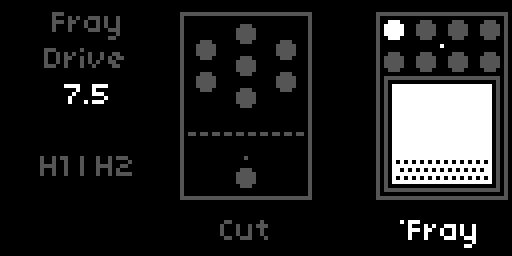
A gate at the front of the signal chain, before Push, bypassed by default. The detector reads (L + R) × 0.5. Threshold sets the level the signal must exceed to open the gate; Range sets how far the signal is attenuated when the gate is closed (−75 dB is near silence, a smaller value like −12 dB ducks rather than mutes). Attack and Release are the open and close ramp times, both reaching up to 2.5 s: a long Attack gives slow-gear volume swells, a fast Attack with short Hold and Release gives percussive chopping. Hold keeps the gate open for a set time after the signal drops, preventing chatter and sustaining tails. Margin sets the gate's hysteresis: it widens the gap between the open and close thresholds, from none up to 25 dB. Detection picks a fast Peak follower or a smoother RMS follower. All six continuous parameters are Mod Rack and Sense targets, so an LFO on Threshold synced to the clock produces rhythmic gating. Attack, Hold and Release use an exponential taper, so small values step finely and large values step coarsely. A Cut: Toggle trigger switches the gate in and out. Cut shares a Studio pane with Fray, and appears in the Stage chain as CUT.
Fray
| Parameter | Default | Range / Options |
|---|---|---|
| Fray Engage | Bypass | Bypass / Active |
| Drive | 7.5 | 0–10 |
| Comp | 5 | 0–10 |
| Stab | 0 | 0–10 |
| Octave | 0 | 0–10 |
| Oct Mode | Up | Down / Up / Both |
| Gate | 0 | 0–10 |
| Tone | 10 | 0–10 |
| Volume | 5.0 | 0–10 |
A deliberately unstable fuzz in the Fuzz Factory tradition, sitting between Cut and Push and bypassed by default. Where Push is a clean boost and Distort a straight overdrive, Fray is the third kind: a starved circuit that spits, chokes and, pushed far enough, sings on its own.
Drive is the fuzz gain, from a rough edge up to a fully saturated square. Comp starves the operating point, and does it dynamically: the bias drifts further off centre as the note dies away, so the tail chokes and spits instead of decaying evenly. That is the velcro splutter, and it lives in the decay rather than the attack.
Stab collapses the supply under load and feeds the stage back into itself. Low settings add a sag and a bloom on hard notes; towards the top the feedback path narrows into a resonance and the circuit sings on its own after you stop playing. The whole range is usable, because the feedback is injected after the input stage has been brought to a fixed level, so its loop gain does not ride on Drive.
Octave sets how much of an added octave is blended in, and Oct Mode picks which one. Up rectifies the signal to double its frequency, the classic octave fuzz; it speaks clearest at moderate Drive, because a fully squared signal has little left to rectify, so back Drive off if the octave gets lost. Down clocks a flip-flop divider off the zero crossings for a sub-octave, as in an analogue octave pedal, and follows your dynamics rather than sitting at a fixed level. Both mixes the two for a wide, slightly unhinged stack. At Octave 0 the switch does nothing.
Gate chokes the decay rather than letting it fizzle out, and reads the input rather than the fuzz, so it cuts note tails instead of strangling the distortion. Tone is a low-pass after the fuzz, fully open by default and reaching down to 750 Hz; its top sits at 7.5 kHz because the input stage already band-limits the whole chain there, so there is nothing above that to keep. Volume sets the output level. At 5.0 Fray sits about 1 dB above the clean amp with its default settings, so switching it on adds a slight lift rather than a jump; pull Volume down as Drive goes up.
Gate and Stab are the two worth handing to the Mod Rack: an LFO on Gate gives rhythmic stutter, and one on Stab makes the circuit wander in and out of oscillation. All seven continuous parameters are Mod Rack and Sense targets, Oct Mode being a plain switch, and a Fray: Toggle trigger can switch the whole pedal in and out.
Being bypassed by default it costs nothing until engaged: like Push and Distort it runs as a spawned insert, so a bypassed Fray is not merely silent but absent from the graph.
Push
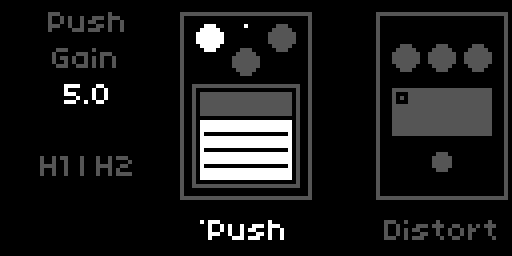
| Parameter | Default | Range / Options |
|---|---|---|
| Push Engage | Bypass | Bypass / Active |
| Gain | 5.0 | 0–10 |
| Tone | 5.0 | 0–10 |
| Level | 5.0 | 0–10 |
| Mix | 25 % | 0–100 % |
Overdrive with asymmetric diode clipping. Tone sweeps a high-pass filter from 100 Hz (warm, full) to 750 Hz (tight, cutting). Mix is a parallel wet/dry blend: at 0 % the effect is 100 % wet; at 100 % the dry signal is mixed back in 50/50. Useful for retaining pick attack and low-end body while adding saturation on top. At the default Level of 5.0 Push sits about 0.5 to 1 dB above the clean amp, a slight lift rather than a jump.
Distort
| Parameter | Default | Range / Options |
|---|---|---|
| Distort Engage | Bypass | Bypass / Active |
| Gain | 5.0 | 0–10 |
| Tone | 7.5 | 0–10 |
| Level | 5.0 | 0–10 |
| Low Cut | Off | Off / 100 Hz / 250 Hz |
Hard clipping distortion. Tone sweeps a low-pass filter from 300 Hz (muffled, murky) to 5000 Hz (open, cutting). Low Cut applies a post-drive high-pass filter to remove accumulated sub-bass. At the default Level of 5.0 Distort sits about 0.5 to 1 dB above the clean amp.
Warp
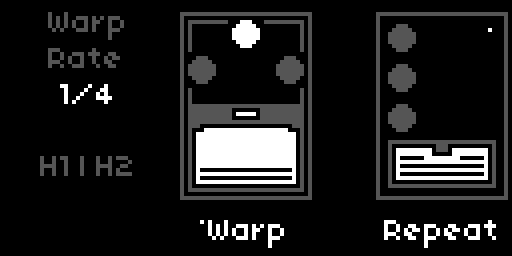
| Parameter | Default | Range / Options |
|---|---|---|
| Warp Engage | Bypass | Bypass / Active |
| Rate | 2.5 Hz | 0.1–25 Hz (exp) |
| Depth | 5 % | 0–100 % |
| Rise/Fall | 2.5 s | 0.01–5.0 s (exp) |
| Mix | 0 % | 0–100 % |
| Sync | Off | Off / 8/1 / 4/1 / 2/1 / 1/1 / 1/2 / 1/4 / 1/8 / 1/16 / 1/32 / 1/64 |
| Sync Feel | Note | Note / Dotted / Triplet |
| Tap Div | 1/4 | 8/1 / 4/1 / 2/1 / 1/1 / 1/2 / 1/4 / 1/8 / 1/16 / 1/32 / 1/64 |
| Tap Feel | Note | Note / Dotted / Triplet |
| Tap | trigger | PARAMS and MAP |
Pitch vibrato via modulated delay. At 0 % Mix the effect is 100 % wet; increasing Mix blends in the dry signal, moving from pure vibrato toward a chorus character. Rise/Fall controls the onset time when bypass is lifted and the fade time when bypass is engaged.
Set Sync to a division to lock Rate to the Norns clock. See Synchronization for the full model.
Repeat
| Parameter | Default | Range / Options |
|---|---|---|
| Repeat Engage | Bypass | Bypass / Active |
| Time | 250 ms | 1–1000 ms |
| Feedback | 50 % | 0–100 % |
| Level | 50 % | 0–100 % |
| Color | Bright | Bright / Dark |
| Sync | Off | Off / 8/1 / 4/1 / 2/1 / 1/1 / 1/2 / 1/4 / 1/8 / 1/16 / 1/32 / 1/64 |
| Sync Feel | Note | Note / Dotted / Triplet |
| Tap Div | 1/4 | 8/1 / 4/1 / 2/1 / 1/1 / 1/2 / 1/4 / 1/8 / 1/16 / 1/32 / 1/64 |
| Tap Feel | Note | Note / Dotted / Triplet |
| Tap | trigger | PARAMS and MAP |
BBD-style analog delay with jitter and saturation in the feedback path. Color switches between a brighter and a darker feedback tone.
Set Sync to a division to lock Time to the Norns clock. See Synchronization for the full model.
Tap tempo
With Warp or Repeat focused, K2 taps the tempo. The second tap sets the value, and every further tap refines it, averaged over the last four intervals. A pause longer than two seconds, or more than twice the running interval, starts a new series. The readout jumps to Rate or Time and blinks on every tap.
A tap marks one beat. Tap Div and Tap Feel (PARAMS, under Synchronization) say what that beat means for the effect: at 1/4 Note the delay time equals the tap interval, at 1/8 Repeat runs twice as fast as you tap, at 1/4 Dotted one and a half times as slow. Changing Tap Div or Tap Feel recalculates from the last tapped tempo, there is no need to tap again. The calculation is the same one Sync uses, so a tapped 1/8 and a synced 1/8 at the same tempo land on the same value.
Repeat Time ends at 1000 ms, so slow tempos clamp. A clamped tap stays dimmed in the readout until you change the value by hand. Where the clamp starts depends on Tap Div:
| Tap Div | Repeat clamps below |
|---|---|
| 1/2 | 120 BPM |
| 1/4 | 60 BPM |
| 1/8 | 30 BPM |
| 1/16 | 15 BPM |
Warp covers 0.1 to 25 Hz, which takes any tempo a hand can tap.
Tap tempo only works while Sync is Off. With Sync set and the clock running, K2 does nothing on Warp and Repeat, and switching Sync on or off forgets the tapped tempo. If a tap lands while an LFO modulates Rate or Time, it moves the centre of the modulation, as a manual change would.
To tap from a footswitch, map the Tap entry of Warp or Repeat to a CC (see MIDI). If your other gear sends MIDI clock, that is the better route: set SYSTEM > CLOCK > source to MIDI and use Sync instead, which follows the external tempo exactly.
Amp
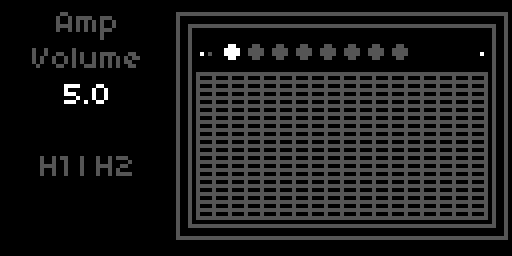
| Parameter | Default | Range / Options |
|---|---|---|
| Amp Enable | Active | Active / Bypass |
| Volume | 5.0 | 0–10 |
| Bass | 2.5 | 0–10 |
| Treble | 5.0 | 0–10 |
| Master | 7.5 | 0–10 |
| Rectifier | Tube 5U4 | Tube 5Y3 / Tube 5U4 / Silicon |
A dedicated Amp Enable toggle lives in the PARAMS menu for MIDI mapping. Same behaviour as Reverb and Tremolo bypass.
Rectifier picks the rectifier in the amp's power supply, which sets how far the supply voltage sags when you dig in and how quickly it recovers. Tube 5Y3 is the stock Princeton: the deepest and slowest sag, the least headroom, an earlier break-up and a looser low end. Tube 5U4 is the Princeton Reverb's rectifier and the amp as it always sounded. Silicon barely sags and recovers fast, for more headroom, a tighter attack and a firm low end, the direction of the early Princeton-based Boogie conversions with their bigger power stage. The three settings are level-matched at medium drive, so switching changes the feel, not the volume. Rectifier is set in the PARAMS menu only and is a Mod Rack target (Amp: Rectifier).
Tremolo
| Parameter | Default | Range / Options |
|---|---|---|
| Tremolo Enable | Active | Active / Bypass |
| Speed | 2.5 Hz | 0.1–25 Hz (exp) |
| Intensity | 0 % | 0–100 % |
| Sync | Off | Off / 8/1 / 4/1 / 2/1 / 1/1 / 1/2 / 1/4 / 1/8 / 1/16 / 1/32 / 1/64 |
| Sync Feel | Note | Note / Dotted / Triplet |
On the device, turn Intensity to 0 to silence the tremolo. A dedicated Tremolo Enable toggle lives in the PARAMS menu for MIDI mapping, same rationale as Reverb Enable.
Set Sync to a division to lock Speed to the Norns clock. The encoder strip then displays the division name (e.g. 1/8, 1/4.) instead of Hz. See Synchronization for the full model.
Hold
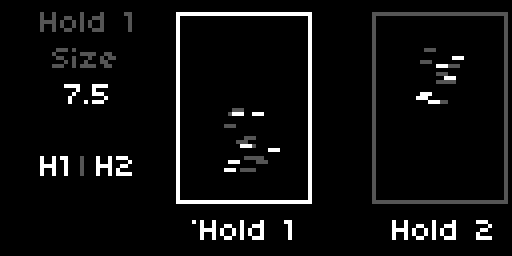
Two independent granular freezes, Hold 1 and Hold 2, running in parallel between Tremolo and Loop so they capture the fully amped, post-tremolo signal. The held pads go into the looper's input along with the live signal, so a loop recorded or overdubbed while a pad is held keeps it, while a loop that is only playing leaves it untouched. The Hold recorder itself listens to the live signal alone, so a new freeze never captures the pad that is still sounding. Engaging a Hold grabs the last ~1.2 seconds you played and sustains it as a granular pad; the live signal always passes through underneath, so you can play over the held sound. Because the pad is built from grains reading a frozen snapshot, it never loops audibly and can be transposed without running out. A single rolling recorder feeds both instances, so the second one costs only its own grain playback.
Both instances share the same parameter set, in the PARAMS groups HOLD 1 and HOLD 2. They are set up to differ out of the box: Hold 2 starts with Size, Density and Spread at 7.5, and the two are pitched opposite ways, Hold 1 an octave down and Hold 2 an octave up, each mixed in lightly at 10 %.
| Parameter | Default | Range / Options |
|---|---|---|
| Engage | Bypass | Bypass / Active |
| Size | 5 | 0–10 |
| Density | 5 | 1–10 |
| Spread | 5 | 0–10 |
| Pitch | −12 st (Hold 1) / +12 st (Hold 2) | −24–+24 st |
| Pitch Mix | 10 % | 0–100 % |
| Reverse Mix | 0 % | 0–100 % |
| Shape | Smooth | Smooth / Soft / Swell / Pluck / Plateau |
| Resolution | Fine | Coarse / Fine |
| Gain | 5 | 0–10 |
| Level | 5 | 0–10 |
| Rise | 0.25 s | 0.01–5.0 s (exp) |
| Fall | 2.5 s | 0.01–5.0 s (exp) |
Engage is the freeze itself: switch to Active to grab and hold, back to Bypass to release. The pad fades in over Rise and out over Fall, so a long Fall lets the held chord bloom away after you release. Re-engaging while a previous Fall is still running spills the old pad over the new one for a smooth crossfade.
Gain drives the pad into a soft saturation for thickness and character; Level is its output level in the mix, and the two are independent. Size sets the grain length, longer toward 10 for a smoother, more sustained pad. Density sets how thickly the grains overlap. Spread scatters the grain onsets in time, from a tight, regular texture at 0 to a diffuse cloud at 10.
Pitch transposes the pad in semitones (−12 is one octave down, +12 one octave up). Pitch Mix sets how many grains get that transposition: at 100 % the whole pad is shifted, at lower values only a fraction is, so the default of 10 % sprinkles a few octave grains over an otherwise untransposed pad.
Reverse Mix sets how many grains play backwards, decided per grain like Pitch Mix. At 0 % everything runs forwards; small amounts add a soft, swelling shimmer against the forward grains, and at 100 % the whole pad runs in reverse. It combines with Pitch, so a grain can be both transposed and reversed.
Shape sets the grain window and with it the character of every grain: Smooth is the neutral bell, Soft is gentler still, Swell rises slowly then cuts off (a reverse-tape feel), Pluck attacks fast and tails off (articulated, almost rhythmic), and Plateau is nearly flat for the densest, most present pad. Plateau does not fall to silence at the grain edges, so it can add a faint edge to the texture. Resolution trades CPU against pitch quality: Fine is cleanest, Coarse is cheaper and only sounds grainier when Pitch is in use, so an untransposed instance can run Coarse to save headroom.
Each Hold is a full Mod Rack target (Size, Density, Spread, Pitch, Pitch Mix, Reverse Mix, Gain, Level per instance), and Hold 1: Toggle and Hold 2: Toggle triggers can switch either freeze on and off rhythmically. In the Stage chain both appear, joined by a divider to show they run in parallel.
Loop
| Parameter | Default | Range / Options |
|---|---|---|
| Step Order | Rec·Play·Dub | Rec·Play·Dub / Rec·Dub·Play |
| Play From | Start | Start / Cue |
| Mode | Overdub | Overdub / Overwrite / Sample / Resample |
| Direction | Forward | Forward / Reverse / Pendulum / Random |
| Rec Level | −2.5 dB | −40–0 dB |
| Play Level | −2.5 dB | −40–0 dB |
| Fade Level | −2.5 dB | −40–0 dB |
| Speed | 0 % | −100–+100 % |
| Speed Control | Steps | Steps / Smooth |
Step Order picks which K2 sequence the looper follows: Rec → Play → Dub → Play … (default) or Rec → Dub → Play …. K3 is unaffected.
Play From controls what happens when playback resumes after a stop. Start always returns to the beginning of the loop. Cue resumes from the position where the loop was stopped.
Mode selects how dub passes interact with the buffer. Overdub layers new material over existing. Overwrite replaces it. Sample stops after one playback pass; K2 retriggers from the Play From position. Resample records the loop output back into the buffer including the medium's degradation chain.
Direction sets the loop playback direction. Forward is conventional. Reverse plays the buffer backwards. Pendulum alternates forward and reverse at each loop boundary. Random flips direction unpredictably at each boundary for generative texture.
Rec Level and Play Level control recording gain (initial pass and overdub) and playback gain independently. Fade Level sets the gain curve at the loop boundary fade.
Speed is bipolar. In Steps mode it snaps to −100 % (half speed, octave down), 0 % (normal), or +100 % (double speed, octave up). In Smooth mode it moves continuously across the full range, exponentially mapped (2 ^ (Speed/100)). Speed affects both record and replay.
Medium
| Parameter | Default | Range / Options |
|---|---|---|
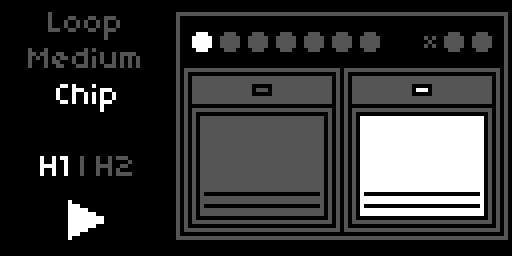
| Medium | Chip | BBD / Cassette / CD / Chip / Tape / Vinyl |
| Imprint | 10 % | 0–100 % |
| Wear | 5 % | 0–100 % |
| M: BBD Tone | Bright | Bright / Dark |
| M: Cassette Wow | 5 % | 0–100 % |
| M: CD Errors | 0 % | 0–100 % |
| M: Chip Crush | 0 % | 0–100 % |
| M: Tape Wow | 5 % | 0–100 % |
| M: Vinyl Noise | 10 % | 0–100 % |
Medium picks the storage type the loop pretends to be, and it works in two layers. Imprint and Wear are destructive: they bake the medium's base character (its filtering and saturation) into the buffer. Imprint controls how strongly that base character colours the signal at the moment of recording: at 0 % the buffer captures your input clean, at 100 % the first repeat already has the medium's full character. Wear controls how much it degrades the loop on each subsequent pass: at 0 % the loop holds its captured state indefinitely, at higher values it erodes a little more every cycle. The M: parameters are the second layer: medium-specific effects that live on the playback side, non-destructive and reversible in real time. They colour the loop on the way out without ever touching the buffer, so you can dial them while a loop plays and they read back instantly. Because each medium is its own internal looper, the Medium is fixed for the life of a loop: choose it before you record. Changing Medium while a loop exists clears that loop and returns the looper to idle; the new medium then applies to your next recording. The six media, with their characteristic flavour:
- BBD. Bandwidth-limited LPF, op-amp bias, tanh saturation, baked in by Imprint and Wear. M: BBD Tone sets the bandwidth (Bright or Dark, the same two cutoffs as the Repeat pedal's Color). It is the one M: parameter that acts on both sides: it bakes the bandwidth as you record and also filters on playback, so you can darken a recorded loop live down to its baked limit, but not brighten past it.
- Cassette. Bandpass with misbias saturation, amplitude crinkle, and a subtle FM artefact, baked in. M: Cassette Wow adds wow and flutter on the playback side, independent of Imprint and Wear.
- CD. The clean medium of the roster: the recording lands almost pristine and only develops a gentle high-frequency rolloff over passes (the CD ageing in the sun). Its character lives entirely on the playback side: skips that jump the read head to a new buffer position, stutters that lock the head on a 100 ms region for several repetitions, and brief dropouts that mute the loop. M: CD Errors scales the rate of all three together; the rest of the time the loop plays clean.
- Chip. Bit-depth and sample-rate reduction baked in, with the aliasing that comes for free; low-resolution sample-playback in the spirit of ISD voice chips, vintage DAC hardware, and early samplers like the SP-1200. M: Chip Crush is an additional live bitcrusher on the playback side, perceptually curved so it bites from roughly a third of the way up.
- Tape. Wide LPF, misbias saturation, compander LPF, and short print-through, baked in. M: Tape Wow adds wow and flutter on the playback side.
- Vinyl. Gentle high-frequency rolloff baked in, plus a pronounced slow read-side pitch wobble (a warped-record warble). M: Vinyl Noise adds live surface noise on the playback side: fine high-frequency crackle over a continuous low dust haze, sparse at low values, dense when turned up.
The two layers sit on different paths. Imprint and Wear are destructive: Imprint colours the input as it enters the buffer (a one-shot at record time), Wear reprocesses the buffer's existing content on every loop pass and folds it back in (accumulating over time). Both bake only the medium's base character. The M: parameters never write to the buffer; they are read-path effects applied to the loop on its way out, reversible and live even on a loop recorded minutes ago. The one exception is M: BBD Tone, which sets a bandwidth used on both sides. With Imprint at 0 and Wear at 0, the buffer captures your input clean and holds it indefinitely, and only the selected medium's M: effects colour the playback.
Destructive write paths (base medium character, scaled by Imprint / Wear)

  input  ──► base character (scaled by Imprint) ──► BufWr ──► buffer      (one-shot at record)
  buffer ──BufRd──► base character (scaled by Wear) ──► BufWr ──► buffer  (accumulates per pass)
                                                                    ↺

Non-destructive read path (M: effects, reversible, never write back)

  buffer ──BufRd──► M: wow / crackle / crush / CD errors / BBD tone ──► output → Tremolo → Spring reverb → ...
Quantization
| Parameter | Default | Range / Options |
|---|---|---|
| Quantize | Off | Off / 8/1 / 4/1 / 2/1 / 1/1 / 1/2 / 1/4 / 1/8 / 1/16 / 1/32 / 1/64 |
| Quantize Feel | Note | Note / Dotted / Triplet |
When the Norns clock is running and Quantize is set to a division, every K2 transition (record start, record end, play→dub, dub→play, stop) waits for the next beat boundary. Off is free-running. See Synchronization for how the division and feel combine.
Spring Reverb
| Parameter | Default | Range / Options |
|---|---|---|
| Reverb Enable | Active | Active / Bypass |
| Amount | 25 % | 0–100 % |
| Length | 2.5 s | 0.5–5.0 s |
| Low Shelf | 0 dB | −5–+5 dB |
| High Shelf | 0 dB | −5–+5 dB |
On the device, turn Amount to 0 to silence the reverb. A dedicated Reverb Enable toggle lives in the PARAMS menu for MIDI mapping. Useful when you want to kill the reverb instantly from a footswitch and restore it to the same Amount with a second press.
Length sets the spring tank decay independently of Amount, so you can keep the send level low and still get a long ring. Low Shelf at 250 Hz and High Shelf at 3500 Hz colour the wet path. Pull the high shelf down for a darker bloom; lift it for a brighter shimmer.
Cab & Mic Simulation
| Parameter | Default | Options |
|---|---|---|
| Cab Mode | Cab & Mic Sim | Bypass / Cab & Mic Sim |
| Mic Position | Middle | Center / Middle / Edge |
Cab Mode picks the cabinet processing path. Bypass removes all cabinet colour, useful for a raw DI tone or for feeding an external powered cab. Cab & Mic Sim runs the built-in Jensen 10" model at the Mic Position you set: Center is brightest and most present, Middle is balanced, Edge is darker and rounder.
EQ
| Parameter | Default | Range / Options |
|---|---|---|
| EQ Engage | Bypass | Bypass / Active |
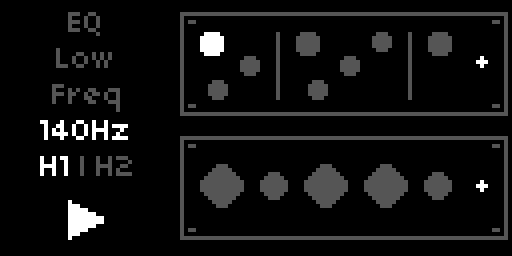
| Low Freq | 140 Hz | 100 / 140 / 200 / 300 Hz |
| Low Boost | 0 dB | 0–10 dB |
| Low Cut | 0 dB | 0–10 dB of cut |
| High Freq | 3 kHz | 1 / 1.5 / 2 / 3 / 4 / 5 kHz |
| Bandwidth | Sharp | Sharp / Broad |
| High Boost | 0 dB | 0–10 dB |
| High Cut | 0 dB | 0–10 dB of cut |
| Gain | 0 dB | −20–+20 dB |
A program equaliser in the Pultec tradition, sitting after the master gain and before Limit, bypassed by default. It is placed after the amp's soft clipping so a large low boost shapes the finished sound rather than being driven into saturation, and before the limiter so that Limit keeps the last word on level.
The signature move is running Low Boost and Low Cut at the same time. On an ordinary EQ that would cancel out; here it does not, because the two are different shapes. Low Boost is a shelf at Low Freq, while Low Cut is a dip three times higher up. Turning both up therefore leaves a lift at the very bottom with a scoop just above it, which tightens the low end while making it sound bigger. Each also works alone: Low Boost on its own is a plain bottom lift, Low Cut on its own thins out the low mids.
High Boost is a peak at High Freq, with Bandwidth choosing between a narrow, focused lift and a broad, airy one. High Cut is a shelf above 3 kHz for taking the edge off. Gain trims the output, which you will want when boosting hard.
The frequencies are picked for what actually arrives here rather than for the original hardware. The cab simulation sits ahead of the EQ and band-limits the signal hard, with a high pass around 90 to 100 Hz and a low pass between 3.8 and 6.5 kHz depending on mic position. A Pultec's own low band of 20 to 100 Hz would therefore be lifting silence, and its high attenuator at 10 to 20 kHz would have nothing left to cut. Bypassing Cab & Mic opens the range back up, so the same controls bite differently there.
The four boost and cut amounts and Gain are Mod Rack and Sense targets; the three selectors are plain switches. An EQ: Toggle trigger switches the whole unit in and out. EQ shares a Studio pane with Limit, drawn as two rack units, and appears in the Stage chain as EQU.
Limit
| Parameter | Default | Range / Options |
|---|---|---|
| Limit Engage | Active | Bypass / Active |
| Threshold | −10 dB | −40–0 dB |
| Ratio | 2.0 : 1 | 2.0–20.0 : 1 |
| Attack | 10 ms | 1–100 ms |
| Decay | 200 ms | 50–2000 ms |
| Gain | 0 dB | −20–+20 dB |
Output compander, last in the chain after EQ, active by default. The defaults are set for a gentle safety net rather than an effect: the threshold sits about 10 dB above the peaks of a clean amp at the default Volume, so it only catches peaks: a clean sound and the drives at their default levels pass untouched, and only what rises well above them, a drive with its level turned up, a hot Volume setting or a stacked loop, is pulled back at 2:1. The 10 ms attack lets the pick attack through, the 200 ms decay keeps the level steady without pumping. Threshold sets the knee; signal above it is compressed at the chosen Ratio. Gain compensates for the level reduction. Attack and Decay shape the envelope follower. Bypass it if you want the raw output, for example when another device downstream does the leveling.
Sense
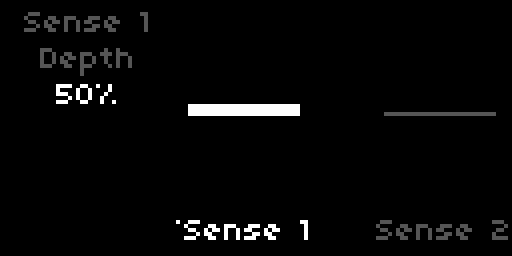
Two envelope followers (the Sense modules), each with the following parameters:
| Parameter | Default | Range / Options |
|---|---|---|
| Engage | Off | Off / On |
| Depth | 50 % | 0–100 % |
| Direction | + | + / − |
| Slew | 50 ms | 1–500 ms |
| Target Device | - | device group |
| Target Param | - | parameter within device |
Each Sense module tracks the amplitude of the raw input signal, before the pedals. In Mono input mode the detector reads the left jack only; in Stereo input mode it reads (L + R) × 0.5 so both channels drive the envelope together.
Depth scales the modulation contribution; at 100 % Sense can sweep the target across its full parameter range. Direction picks whether the modulation pushes the target upward from its base value (+) or downward (−). Slew sets the time constant of the amplitude detector itself, with the same value used for both attack and release: short Slew gives snappy, percussive tracking, long Slew gives a sluggish, smooth contour that ignores transients.
Target Device and Target Param select what Sense modulates. The device list and parameter list are the same as the Mod Rack's, minus parameters already claimed by another source. The ownership pool is shared with the Mod Rack: a target can be claimed by at most one LFO or one Sense module at a time, and it is claimed the moment a source points at it, even before that source is enabled. The claimed target's PARAMS entry carries the (M) prefix whether or not the source is running; enabling the source is what starts the value moving. Both Sense modules ship with no target (-); pick a Device and the first free parameter is selected automatically, and setting the Device back to - releases the target.
In the Mod Rack, each Sense pane shows a live amplitude visualizer with a horizontal centerline. A bar fills upward from the centerline when Direction is +, downward when Direction is −, with its height proportional to the current detected amplitude times Depth. The bar saturates at the visual ceiling well before the math saturates, so it acts as a useful indicator that the envelope is driving its target hard. Short-press K3 on the pane to toggle Enable.
Mod Rack
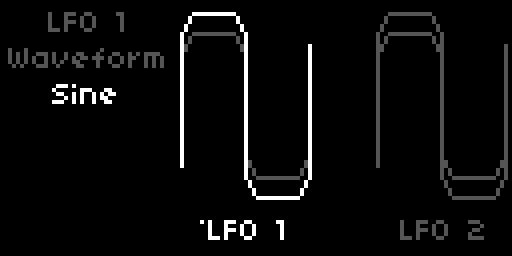
Eight LFOs, each with the following parameters:
| Parameter | Default | Range / Options |
|---|---|---|
| Engage | Off | Off / On |
| Waveform | Sine | Sine / Triangle / Saw / Square / Smooth Random / Stepped Random |
| Rate | 1.0 Hz | 0.1–25 Hz (exp) |
| Depth | 50 % | 0–100 % |
| Direction | +/- | + / - / +/- |
| Phase | 0° | 0° / 90° / 180° / 270° |
| Steps | 8 | 1–16 (Stepped Random only) |
| Stability | 50 % | 0–100 % (Stepped Random only) |
| Sync | Off | Off / 8/1 / 4/1 / 2/1 / 1/1 / 1/2 / 1/4 / 1/8 / 1/16 / 1/32 / 1/64 |
| Sync Feel | Note | Note / Dotted / Triplet (when Sync is active) |
| Rate Slew | 0 s | 0–5 s (non-Step-Random only) |
| Target Device | - | device group |
| Target Param | - | parameter within device |
| Randomize | - | trigger (Stepped Random only, in PARAMS / MAP) |
Engage starts the LFO moving its target. Ownership is claimed earlier, the moment the LFO points at a target: the device and parameter dropdowns filter out parameters already claimed by another LFO or Sense module, so two sources can never share a target. A claimed target's PARAMS entry carries the (M) prefix whether or not its owner is enabled. While the owner is disabled the value sits at its base and still responds to manual edits; while the owner is enabled the modulation drives it. Every source ships with no target (-); pick a Device and the first free parameter is selected automatically, and setting the Device back to - releases the target.
Waveform selects the LFO shape. Sine, Triangle, Saw, and Square are standard periodic waveforms. Smooth Random generates a band-limited random signal that interpolates smoothly between values at each cycle boundary. Stepped Random is a shift-register pattern generator: each clock step shifts the register and inserts a new bit.
Rate sets the LFO frequency. When Sync is set to a division, Rate is derived from the Norns clock (same formula as Tremolo and Warp; see Synchronization). While synced, the Rate parameter is hidden from the strip and replaced with the division name. Sync Feel applies the Note/Dotted/Triplet multiplier and is only visible when Sync is active.
Rate Slew smooths abrupt changes to the LFO rate (for example, when another LFO modulates this LFO's rate). The slew time is in seconds. Hidden for Stepped Random, which uses clock-based stepping.
Direction controls how the LFO value maps to the target range. + sweeps from base to base + depth. - sweeps from base to base − depth. +/- sweeps symmetrically around the base.
Steps (Stepped Random) sets the shift-register length in bits. A 1-bit register produces a coin-flip pattern; longer registers produce longer sequences before repeating. Stability controls how often the register feeds back its own most-significant bit (high Stability = more repetition) versus its complement (low Stability = more variation). At 50 % the output is uncorrelated. Randomize is a trigger in PARAMS and MAP that seeds the register with a random value; short-press K2 on the LFO's pane in the Mod Rack triggers the same action.
Target Device and Target Param select what the LFO modulates. The device list groups targets by signal-chain stage (Cut, Fray, Push, Distort, Warp, Repeat, Amp, Tremolo, Hold 1, Hold 2, Loop, Reverb, Cab, EQ, Limit, Count, LFO 1–8). The parameter list shows only the parameters available within the selected device. Tremolo, Warp, and Repeat each expose both their Sync Division and Sync Feel as separate targets, so an LFO can shift a synced effect between Note, Dotted, and Triplet feel in real time. Loop exposes its Quantize division as a target alongside the level and speed controls. Count exposes its whole voice (Root, Register, Level, Length, Division, Scale, Chords, and Scale Play), so an LFO can transpose the metronome line, shift its octave, harmonise it, or resequence its scale-play mode. LFOs can modulate Rate, Depth, Phase, Steps, Stability, Rate Slew, Sync Division, and Sync Feel of other LFOs; routing LFO A into LFO B's rate while LFO B modulates a pedal parameter creates compound motion.
The target list adapts to the state of the destination. For another LFO, only the parameters relevant to its current waveform appear: Phase and Rate Slew on the periodic and smooth-random shapes, Steps and Stability on Stepped Random. Rate is hidden once the destination is synced. Sync Division and Sync Feel are exposed as targets only when sync is already active on the destination, on Tremolo, Warp, Repeat, the looper, and other LFOs alike, so modulation reshapes a sync grid that you have already chosen rather than switching sync on or off. A Sync or Quant target can never be moved to Off by modulation; only a manual edit can. If a destination changes in a way that retires the current target (the waveform changes, sync turns off, the synced rate disappears), the LFO falls back to the first parameter still available.
Walk
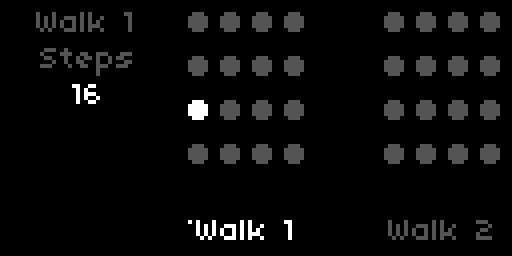
Two step sequencers (the Walk modules), each stepping through up to sixteen values and driving a chosen continuous parameter. Each has the following parameters:
| Parameter | Default | Range / Options |
|---|---|---|
| Engage | Off | Off / On |
| Steps | 16 | 2–16 |
| Step 1 … Step 16 | 0 % | −100 – +100 % |
| Rate | 1.0 Hz | 0.1–25 Hz (exp) |
| Sync | Off | Off / 8/1 / 4/1 / 2/1 / 1/1 / 1/2 / 1/4 / 1/8 / 1/16 / 1/32 / 1/64 |
| Sync Feel | Note | Note / Dotted / Triplet (when Sync is active) |
| Rate Slew | 0 s | 0–5 s |
| Target Device | - | device group |
| Target Param | - | parameter within device |
| Randomize | - | trigger |
A Walk steps through its values in order at Rate, or locked to the Norns clock when Sync is set to a division, looping back to the first step after the last active one. Steps sets how many of the sixteen are used; the rest are skipped, and in the Mod Rack their knobs simply disappear while the used ones stay in place.
Each step is a bipolar amount from −100 % to +100 %, applied relative to the target parameter's current base value: 0 % leaves the target untouched, +100 % drives it to its maximum, −100 % to its minimum. With a target of Amp Volume sitting at 2.5, a step at +100 % reaches 10, a step at −100 % reaches 0, and 0 % holds 2.5. The scaling is asymmetric by design, so ±100 % always lands exactly on the rail wherever the base sits.
Rate Slew smooths the jump between consecutive step values, gliding instead of hard-stepping. Randomize rolls fresh random values into all active steps; it is a trigger in PARAMS and MAP, and short-press K2 on the Walk's Mod Rack pane does the same.
Target Device and Target Param pick what the Walk drives, from the same pool the LFOs and Sense modules use, minus parameters already claimed by another source. The ownership pool is shared: a target belongs to at most one LFO, Sense or Walk at a time. A Walk can also target another Walk's Rate, Steps, Rate Slew, Sync Division and Sync Feel; the two Walk modules appear in every source's device list as Walk 1 and Walk 2, and triggers can fire Walk N: Randomize. As with every device, Sync Division and Sync Feel are modulation targets only once the Walk's own Sync is on.
In the Mod Rack, the Walk pane shows its steps as a grid of knobs. The playing step lights up as a running light; a small dot marks the step selected for editing (E2 scrolls to a step, E3 sets its value). Short-press K3 toggles the Walk on or off.
Triggers
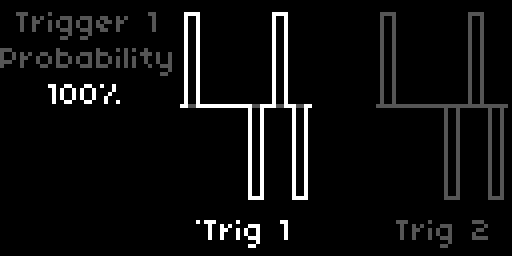
Four event triggers, each with the following parameters:
| Parameter | Default | Range / Options |
|---|---|---|
| Engage | Off | Off / On |
| Probability | 100 % | 0–100 % |
| Rate | 1.0 Hz | 0.1–25 Hz (exp) |
| Sync | Off | Off / 8/1 / 4/1 / 2/1 / 1/1 / 1/2 / 1/4 / 1/8 / 1/16 / 1/32 / 1/64 |
| Sync Feel | Note | Note / Dotted / Triplet |
| Device | Push (Trigger 1) ... Repeat (Trigger 4) | device group |
| Target | Toggle | action within device |
Triggers fire at a chosen rate and dispatch a single action per fire. Probability acts as a coin gate: 100 % fires every tick, 50 % fires roughly every other, 0 % is silent. Engage activates the trigger; while Off, no clock runs and no action fires.
Rate sets the firing frequency in free mode. When Sync is set to a division, Rate is hidden and the firing rhythm is derived from the Norns clock (same formula as Tremolo, Warp, and the LFOs; see Synchronization). Sync Feel applies the Note / Dotted / Triplet multiplier and stays visible alongside Sync Division.
Device and Target select what the trigger fires. Devices are grouped by signal-chain stage in the same order as the LFO target list (Cut, Fray, Push, Distort, Warp, Repeat, Amp, Tremolo, Hold 1, Hold 2, Loop, Reverb, EQ, Limit, LFO 1–8). Each pedal and effect device exposes a single Toggle target that flips the device's bypass state. Each LFO device exposes a single Randomize target, available only when the destination LFO is in Stepped Random waveform; outside Stepped Random the target dropdown shows - and the trigger is a no-op. The Loop device exposes two targets: Rec advances the looper through its K3 transport order (idle → rec → play → dub → play …, with sample-mode retrig in play), and Clear resets the loop unconditionally to idle and empties the buffer.
Triggers guard their targets the same way the LFOs and Sense modules do, but in a pool of their own: no two triggers can fire the same action. Point one trigger at an action and it drops out of the other triggers' Device and Target dropdowns. The trigger pool is independent of the LFO and Sense pool, so a trigger can flip a pedal's bypass while an LFO modulates a parameter inside that same pedal. Each trigger ships with no target (-) and disabled by default; pick an action from the Device and Target dropdowns to assign one.
When a trigger targets LFO N: Randomize and is enabled, that LFO's internal Stepped Random clock is suspended and the trigger becomes the only source of new random steps. Disabling the trigger or pointing it elsewhere returns the LFO to its own internal stepping.
LFOs can modulate trigger Rate and Probability, and, while the trigger is synced, its Sync division and Sync Feel; the trigger devices appear in the LFO target list as Trigger 1 through Trigger 4. Modulating Sync walks a trigger through the clock divisions without leaving the grid: a trigger on Loop: Rec then cuts loops of changing length that all land on the beat. Changing Sync or Sync Feel by hand while a source modulates it moves the centre of the modulation; switching Sync off releases the target and the source falls back to the trigger's next free target.
Synchronization
When the Norns clock is running and a stage's Sync parameter is set to a division (anything except Off), the stage's rate parameter is derived from the BPM instead of its standalone value:
- Tremolo Speed → derived from BPM
- Warp Rate → derived from BPM
- Repeat Time → derived from BPM (
1000 / Hzms) - Looper Quantization → snaps K2 transitions to the next beat boundary
The conversion is beats = base_beats × feel_multiplier, where:
| Division | base_beats |
|---|---|
8/1 |
32 |
4/1 |
16 |
2/1 |
8 |
1/1 |
4 |
1/2 |
2 |
1/4 |
1 |
1/8 |
0.5 |
1/16 |
0.25 |
1/32 |
0.125 |
1/64 |
0.0625 |
| Feel | feel_multiplier |
|---|---|
| Note | × 1.0 |
| Dotted | × 1.5 |
| Triplet | × 2/3 |
Resulting Hz = BPM / (beats × 60). At 120 BPM: 1/4 Note = 2 Hz, 1/4 Dotted = 1.33 Hz, 1/4 Triplet = 3 Hz.
Each effect's range still applies (Tremolo 0.1–25 Hz, Warp 0.1–25 Hz, Repeat 1–1000 ms). The encoder only lands on divisions the current BPM can actually reach: unreachable ones are skipped as you scroll, and if a tempo change pushes the active division out of range it snaps to the nearest reachable one. So at any BPM the strip only shows a division the effect can produce. A division forced out of range by other means (for example from the PARAMS menu) still dims on the encoder strip to flag the clamp.
When an LFO modulates the Time, Speed, or Rate of a synced effect, the modulation centres on the clock-derived value rather than the standalone parameter, so the wiggle tracks the synced time instead of collapsing toward the low manual base.
When the Norns clock source switches to MIDI (PARAMS > CLOCK > SOURCE), all four sync defaults activate automatically (1/4 for Tremolo, Warp, Repeat, and Looper Quantization). Switching back to internal clock deactivates them. Stopping the clock holds the last derived values.
Looper transport
idle ── K3 ──► rec ── K3 ──► play ── K3 ──► dub ── K3 ──► play …
                │
                └── K2 ──► idle (recording aborted, buffer cleared)

play / dub ── K2 ──► stop ── K2 ──► idle (buffer cleared)
stop ── K3 ──► play
The loop keeps running when you open the tuner or pedalboard. Transport keys (K2, K3) are inactive in those views; the loop is not affected.
Transport icons at the bottom of the left display (framed in brackets when a looper parameter is selected):
- ● recording
- ●+ overdubbing
- ▶ playing
- ■ stopped
MIDI
Every parameter, bypass toggle, and looper transport action is available in the PARAMS menu and can be mapped to any MIDI CC using Norns' built-in MIDI learn.
How to map a control
- Open the PARAMS menu (press K1 from the main screen, navigate to PARAMS)
- Scroll to the parameter or action you want to map
- Press K3 to enter MIDI learn mode (the entry flashes)
- Send a CC from your MIDI controller
- Norns assigns that CC to the parameter; the mapping is saved with your PSET
What can be mapped
Cut, Fray, the pedals, Amp, Tremolo, Hold 1 and 2, Loop, Reverb, Cab & Mic, EQ, Limit, Count. All continuous parameters respond to CC values scaled to their parameter range.
Enable toggles (Amp, Reverb, Tremolo, Limit, Push, Distort, Warp, Repeat). CC ≥ 64 enables (Active), CC < 64 bypasses. Cab Mode is a 2-way option (Bypass / Cab & Mic Sim); the CC value is scaled to the option range.
Synchronization. Each stage's Sync (Tremolo / Warp / Repeat) and Quantize (Looper) is an option-type param mappable to a CC. Useful for tap-style division switching from a controller knob.
Looper transport. Each action is a trigger entry visible in both PARAMS and MAP:
| Entry | Action |
|---|---|
| Looper Rec/Play | Same as K3: idle → rec → play → dub → play … / stop → play |
| Looper Stop/Clear | Same as K2: play/dub → stop → idle (buffer cleared) |
Tap tempo. Warp and Repeat each have a Tap trigger, the same as K2 on the focused effect. MAP only listens to CCs; a switch that sends notes cannot tap.
Notes
- MIDI mappings are stored per PSET; each preset can have its own mapping.
- Looper transport triggers respond on CC value ≥ 64. Send value 127 for reliable triggering.
- Enable toggles use CC ≥ 64 for Active and CC < 64 for Bypass. Your controller must send both values (latch or bi-directional CC). A toggle that always sends CC 127 will set the param to Active forever.
- After upgrading from a pre-release build (pre-0.3), delete
dust/data/princeton/princeton.pmapand re-map your CCs. The param type change fromadd_binarytoadd_optionbreaks saved mappings silently. - All MIDI input is on channel 1 by default. Change the channel in PARAMS > MIDI.
Install
Via Maiden: open http://norns.local/maiden and run:
;install https://github.com/notrobintaylor/princeton
Or via SSH:
ssh we@norns.local
cd ~/dust/code
git clone https://github.com/notrobintaylor/princeton
discussion
Like this script? React with 👍 or ❤️ below (needs a GitHub account). Reactions count as likes (♥) on splines, updated daily.