 splines
← all scripts / norns
nornscope
Remote screen + control for monome norns over NDI
install
In maiden's REPL (the >> prompt at the bottom of the editor), run:
;install https://github.com/wildseyed/nornscopeOr add the splines catalog to maiden and install it from the project manager. Restart norns if the script ships a new engine.
readme from wildseyed/nornscope
nornscope
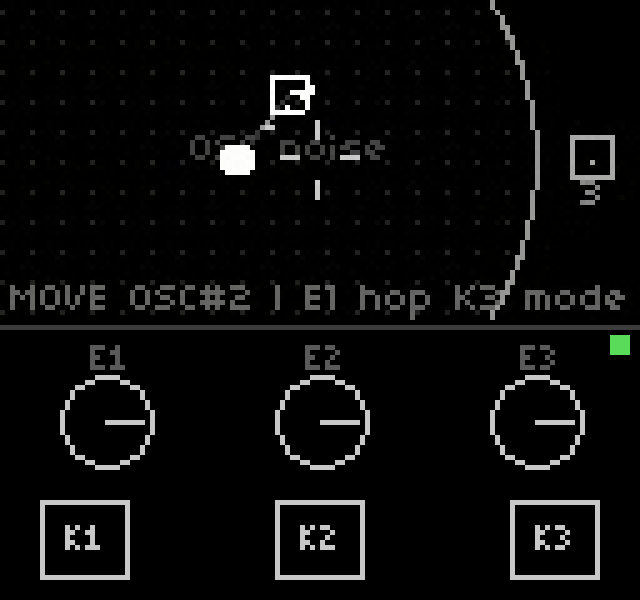
Remote screen + control for the monome norns. Watch the norns screen live in a desktop window and operate its three keys and three encoders with the mouse — works with any script, no script-side support needed.
How it works
- Video out: the norns streams its 128×64 screen over the network via ndi-mod (NDI protocol). nornscope receives it with the official NDI SDK and renders it in a resizable window.
- Control in: key and encoder events are injected through matron's
websocket REPL (
ws://<norns>:5555, the same channel the maiden editor uses) by evaluating_norns.key(n,z)/_norns.enc(n,d)— the exact dispatch functions matron calls for physical hardware input. This makes it fully generic: scripts, system menus, everything responds as if you touched the device. - Feedback: the mod wraps
_norns.key/_norns.encand prints tagged lines (NSQ key 2 1, …) on the same websocket bus, which matron broadcasts to all connected clients. nornscope parses them and lights up its on-screen controls when the real hardware is touched. nornscope's own injections set a Lua flag first (nornscope_remote=true) so they don't echo back.
Features
- Live screen view in a resizable window
- K1 / K2 / K3 — click to tap; press and drag off the button to leave it held ("sticky"); click again to release. Combos are played the way the hardware encourages: stick K1 like a Shift key, then tap K2/K3.
- E1 / E2 / E3 — hover and scroll; 3 wheel ticks per encoder detent so
values don't fly off (
WHEEL_PER_DETENT) - Physical input indicators — press a real key or turn a real encoder on
the norns and the on-screen control lights up amber (knobs also track the
turn); requires the
norns/mod.luapatch below - Connection status dot (green = healthy, amber = heartbeat echo overdue, red = control channel down)
- Color LUTs — right-click opens a menu to recolor the 4-bit greyscale screen: original, amber, inferno, rainbow, magma, plasma, turbo, jet, hot, viridis, ncar, cubehelix. The multi-color ramps are sampled from the visible slice of their matplotlib colormap: level 0 stays black (the screen background) and no signal level goes near-black, so dim traces never vanish
- Self-healing connections: the control channel heartbeats every 3 s with a
Lua
printthat echoes back over the websocket bus, so the watchdog only stays quiet if matron is actually executing (a live socket with a wedged Lua VM still trips it after 12 s). The video receiver re-runs discovery after 10 s without frames, and if the norns comes back with a new IP the control channel retargets to it — a norns reboot recovers by itself within ~15 s - Held keys are released whenever a control session is (re)established, so a reconnect can't leave the device holding a key that was down when the previous connection died
- Every key/encoder injection is logged with the exact Lua sent; send failures are marked loudly
- All keys released on exit so the device is never left with a stuck key
- Control host auto-derived from the NDI source address — zero config
Requirements
Desktop (Linux or Windows):
- SDL2 (Linux only; the Windows zip bundles
SDL2.dll) - NDI runtime libraries (see per-OS install below; free, license-restricted — not vendored here)
- Same LAN/subnet as the norns (NDI discovery uses mDNS)
Norns:
- ndi-mod installed and enabled (SYSTEM > MODS, then SYSTEM > RESTART)
- Recommended: the menu-mode streaming patch below
Install (from a release)
Linux — unpack the tarball and install the two runtime dependencies:
tar -xzf nornscope-linux-x64.tar.gz

# SDL2:
sudo dnf install SDL2             # Fedora
sudo apt install libsdl2-2.0-0    # Debian/Ubuntu

# libndi, from the NDI SDK v6 for Linux tarball
# (https://downloads.ndi.tv/SDK/NDI_SDK_Linux/Install_NDI_SDK_v6_Linux.tar.gz):
sudo cp "NDI SDK for Linux/lib/x86_64-linux-gnu/libndi.so.6"* /usr/local/lib/
sudo ldconfig
# or, without installing system-wide, point the loader at the SDK's lib dir:
export NDI_RUNTIME_DIR_V6="/path/to/NDI SDK for Linux/lib/x86_64-linux-gnu"
Windows — unzip nornscope-windows-x64.zip anywhere and install the
NDI Runtime 6 (same requirement as OBS
DistroAV; if you have that, you're set). All other dependencies are in the zip.
Build
# build tools + SDL2 headers:
sudo dnf install gcc-c++ SDL2-devel pkgconf-pkg-config   # Fedora
sudo apt install g++ libsdl2-dev pkg-config              # Debian/Ubuntu

# download and unpack the NDI SDK (headers only — libndi is dlopened at
# runtime), then symlink it into the repo:
ln -s "/path/to/NDI SDK for Linux" ndi-sdk
make
Windows (cross-compile from Linux)
Requires mingw64-gcc-c++ and the official
SDL2 mingw development package
unpacked under sdl2-mingw/:
make windows        # -> nornscope.exe, ndi_grab.exe
make dist-windows   # -> dist/nornscope-windows-x64.zip (exes + required DLLs)
The Windows build loads NDI dynamically at runtime, so no NDI SDK is needed to build or run it — but the Windows machine must have the NDI Runtime 6 installed. All other dependencies (SDL2.dll, libwinpthread) are included in the zip.
Windows (native build with MSVC or clang)
Requirements:
- Visual Studio 2022 (MSVC) or LLVM clang++ targeting MSVC — both work, no Makefile needed
- SDL2 VC development package
(
SDL2-devel-x.y.z-VC.zip), unpacked anywhere - NDI SDK v6 headers only — from the SDK tarball (the Linux one works fine; the headers are platform-independent) or an existing install. NDI itself is loaded at runtime, so no NDI import lib is involved
From a Git Bash prompt:
NDI_INC="/c/path/to/NDI SDK for Linux/include"
SDL2="/c/path/to/SDL2-2.32.10"

clang++ -O2 -I"$NDI_INC" -I"$SDL2/include" -o nornscope.exe \
    src/nornscope.cpp "$SDL2/lib/x64/SDL2.lib" -lws2_32
clang++ -O2 -I"$NDI_INC" -I"$SDL2/include" -o ndi_grab.exe \
    src/ndi_grab.cpp -lws2_32
or with cl from a "Developer Command Prompt" (cmd syntax):
set NDI_INC=C:\path\to\NDI SDK for Linux\include
set SDL2=C:\path\to\SDL2-2.32.10
cl /O2 /I"%NDI_INC%" /I"%SDL2%\include" /Fe:nornscope.exe src\nornscope.cpp "%SDL2%\lib\x64\SDL2.lib" ws2_32.lib
cl /O2 /I"%NDI_INC%" /I"%SDL2%\include" /Fe:ndi_grab.exe src\ndi_grab.cpp ws2_32.lib
Then copy SDL2.dll (from SDL2\lib\x64\) next to the executables. As with
the cross-built binaries, running them requires the
NDI Runtime 6 installed. Deprecation warnings
from the NDI v6 headers (NDIlib_find_create_v2 etc.) are expected.
Release artifacts
make dist-linux     # -> dist/nornscope-linux-x64.tar.gz
make dist-windows   # -> dist/nornscope-windows-x64.zip
Both builds resolve NDI at runtime (dlopen / LoadLibrary), so neither
artifact contains or requires the NDI SDK — end users install the NDI
libraries themselves per the Install section above.
Norns-side setup
- Install ndi-mod from the maiden console:
;install https://github.com/Dewb/ndi-mod/releases/latest/download/ndi-mod.zip - Enable it: SYSTEM > MODS > NDI-MOD (enc 3 to add
+), then SYSTEM > RESTART.
Norns-side patch (recommended)
Stock ndi-mod only pushes a frame when the script redraws, so the NDI stream
freezes on the last script frame whenever you enter the system menu (K1).
norns/mod.lua is a drop-in replacement for
~/dust/code/ndi-mod/lib/mod.lua that:
- adds a 15 Hz metro calling
ndi_mod.update()unconditionally, so menus stream too (it re-arms after script reloads — norns frees all metros on script change), and - wraps
_norns.key/_norns.encto report physical input to nornscope (the indicator feature above). The tagged lines also show up in the maiden console — filter onNSQif you want to watch them, and - wraps
ndi_mod.update()inpcall, so a single bad frame can't kill the stream metro.
To install it, copy the file over the one ndi-mod shipped, keeping a backup of the original:
ssh we@norns.local 'cp dust/code/ndi-mod/lib/mod.lua dust/code/ndi-mod/lib/mod.lua.orig'
scp norns/mod.lua we@norns.local:dust/code/ndi-mod/lib/mod.lua
(replace norns.local with your device's IP if mDNS doesn't resolve), then
SYSTEM > RESTART on the norns so matron reloads the mod. To go back to stock,
copy mod.lua.orig back over mod.lua and restart again. Note that
reinstalling or updating ndi-mod will overwrite the patch — re-apply it
afterwards.
Usage
./nornscope           # connect to first NDI source matching "NORNS"
./nornscope MySource  # match a different source name substring
Helpers:
./ndi_grab                          # CLI: discover, grab one frame -> /tmp/norns_ndi.ppm
python3 tools/ws_send.py '<lua>'    # one-off commands on the matron REPL (fire and forget)
python3 tools/ws_q.py '<lua>'       # same, but prints matron's reply
ws_send.py examples:
python3 tools/ws_send.py '_norns.key(3,1)' '_norns.key(3,0)'   # tap K3
python3 tools/ws_send.py '_norns.enc(1,-2)'                      # E1 CCW 2
python3 tools/ws_q.py 'print(norns.menu.status())'               # query, see the answer
Troubleshooting
- Firewall: open mDNS and the NDI port range on the desktop, e.g. firewalld:
sudo firewall-cmd --permanent --add-service=mdns sudo firewall-cmd --permanent --add-port=5960-5989/tcp --add-port=5960-5989/udp sudo firewall-cmd --reload - OBS instead of a dedicated viewer: OBS + DistroAV works too. On Flathub,
DistroAV 6.x discovers sources through the host Avahi daemon and the sandbox
blocks it by default — fix with:
flatpak override --user --system-talk-name=org.freedesktop.Avahi com.obsproject.Studio - Keys stop reaching the norns (e.g. after it reboots): the viewer should
recover on its own within ~15 s (heartbeat + reconnect). If the status dot
stays red, check the log on stderr — every injected event is logged as
sent: <lua>, with(FAILED)on errors. - Flaky stream on recent norns OS: the 60 Hz display refresh change broke ndi-mod for some users; norns update 2.9.4 (2026-01) shipped a screen-context fix for it. Keep the norns updated.
Repo layout
src/nornscope.cpp  GUI viewer + remote control (SDL2 + NDI SDK + ws REPL)
src/ndi_grab.cpp   single-frame CLI grabber / connectivity test
src/ndi_loader.h   runtime NDI loading (dynamic DLL resolution on Windows)
tools/ws_send.py   minimal stdlib websocket client for the matron REPL
tools/ws_q.py      same, printing matron's replies
tools/ws_q_host.py ws_q.py with an explicit host argument
norns/mod.lua      ndi-mod patch: stream system menus too + report physical input
Makefile           native + mingw cross-build (set NDI_SDK=, SDL2_MINGW=)
build-win.bat      one-shot native MSVC build (finds vcvars64 itself)
License
MIT — use it for anything, just keep the copyright notice.
norns/mod.lua is borrowed and modified from
Dewb/ndi-mod (© 2022 Michael Dewberry),
which is also MIT. The MIT terms under which that code is reused: it may be
copied, modified, and redistributed freely, provided the original copyright
notice and permission notice are included — they are reproduced in full in the
header comment of norns/mod.lua.
Credits
- Dewb/ndi-mod — the norns-side NDI sender
(see License above for the reuse terms of its
mod.lua) - NDI® is a trademark of Vizrt/NewTek; the NDI SDK is used under its license
- monome norns
discussion
Like this script? React with 👍 or ❤️ below (needs a GitHub account). Reactions count as likes (♥) on splines, updated daily.