 splines
← all scripts / norns
norns-remote
The monome norns screen in any browser, with its keys and knobs: pixels as data, not video, like m8c for the M8
install
In maiden's REPL (the >> prompt at the bottom of the editor), run:
;install https://github.com/0xmch/norns-remoteOr add the splines catalog to maiden and install it from the project manager. Restart norns if the script ships a new engine.
readme from 0xmch/norns-remote
norns-remote
The monome norns screen in any browser, with its keys and knobs, the way m8c works for the Dirtywave M8: the norns sends what is on its screen as data, not video, and the page draws it.
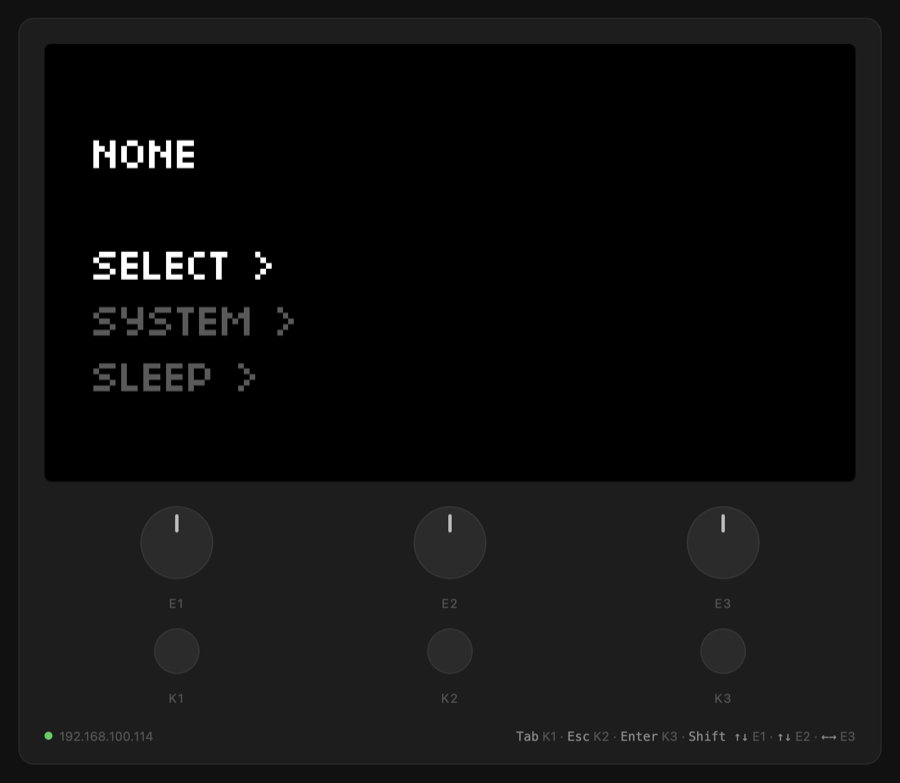
- Pixel-exact: the screen is 128×64 pixels in 16 levels, and the page draws exactly those pixels at any size. Nothing is encoded as video, so nothing blurs or stutters.
- Light: the norns sends a frame only when the screen changes (plus one a second), about 300 bytes once compressed. With no browser connected, it sends nothing.
- Everything shows: scripts, the system menus, and the screen with no script loaded.
- More than the device: a panel with every parameter of the running script as sliders, menus and buttons, live as they change; the mixer, reverb, compressor and clock; a script browser that loads a script with a click; output level meters; screenshots; screen colors.
- Any device: a Mac, PC, tablet or phone on the same network. Nothing to install besides the mod; the relay uses only Python's standard library, which every norns has.
Install
In maiden's REPL:
;install https://github.com/0xmch/norns-remote
Then on the norns, enable the mod: go to SYSTEM > MODS, select NORNS-REMOTE, and
turn E3 until a + shows. Then go to SYSTEM > RESTART.
Open http://norns.local:8099/ in a browser, or the norns' IP address instead of
norns.local. On a Mac, Chrome can open it as an app window of its own:
open -na "Google Chrome" --args --app=http://norns.local:8099/
Controls
| norns | keyboard | mouse or touch |
|---|---|---|
| K1 | Tab or 1 | click K1 |
| K2 | Esc, Backspace or 2 | click K2 |
| K3 | Enter or 3 | click K3 |
| E1 | Shift+Up/Down, Page Up/Down | drag or scroll on E1 |
| E2 | Up/Down | drag or scroll on E2 |
| E3 | Left/Right | drag or scroll on E3 |
Keys follow the press and the release, so holding K1 works as on the device. The keyboard map uses key positions, so it is the same on any keyboard layout. One knob step is one step on the norns: the norns needs several encoder ticks per step (8 for E1 in the menus), and the mod sends as many as the current setting needs.
A MIDI controller over the network
The mod adds a MIDI device to the norns, "Midi Fighter Twister" on port 1, whose
messages come over the network: OSC /norns-remote/midi to port 10111, with the MIDI
bytes as integer arguments. What the norns sends to it goes back the same way, to
whoever sent the last message. To the norns it is an ordinary device, so MIDI learn
(PARAMETERS > MAP) and scripts that look for a Twister by name (haze) work as with a
real one. A controller on another computer can be plugged in this way; send it as a
factory-configured Twister: knobs absolute 0-127 on channel 1 (CC 0-15), pushes on
channel 2.
Its knobs play the first 16 settings of whatever script is loaded (the auto-map), with ring values (channel 1) and colors (channel 2) sent back. A knob mapped with MIDI learn follows that mapping instead, and scripts that name the Twister in their source drive it themselves.
/norns-remote/setid <id> <value> sets a parameter by its id, for tools that do not
track parameter indexes.
How it works
lib/mod.lua, the mod: starts the relay and hookslib/remote.luainto matron.lib/remote.lua: while the relay says a browser is connected, it reads the screen 30 times a second withscreen.peekand sends it over OSC (one letter per pixel) when it changed. It sends the parameter list when a script loads, the values that changed 5 times a second, and the output levels 15 times a second, as JSON. It runs the commands the relay passes on: knob steps (turned into the right number of encoder ticks), parameter changes, script loads.relay.py: serves the page and a websocket on port 8099, sends each screen to the browsers as 8192 levels, zlib-compressed, passes the JSON on, lists the installed scripts, and sends keys to matron's/remote/keyOSC command and everything else to the mod.index.html: the page.
To try a change to lib/remote.lua without restarting the norns, reload it from
maiden's REPL: norns_remote = dofile(paths.code .. "norns-remote/lib/remote.lua").
Anyone on your network can open the page and control the norns, as they can already with maiden. The relay listens on port 8099; the mod and the relay talk on port 10112, on the norns only.
Uninstall
Disable the mod in SYSTEM > MODS, then SYSTEM > RESTART. Delete
dust/code/norns-remote to remove it.
discussion
Like this script? React with 👍 or ❤️ below (needs a GitHub account). Reactions count as likes (♥) on splines, updated daily.