 splines
← all scripts / norns
midi-review
Simple visualisation, recording and playback of MIDI notes
install
In maiden's REPL (the >> prompt at the bottom of the editor), run:
;install https://github.com/niksilver/midi-reviewOr add the splines catalog to maiden and install it from the project manager. Restart norns if the script ships a new engine.
readme from niksilver/midi-review
midi review
Simple visualisation, recording and playback for the monome norns of what you've just been playing on your MIDI device.
I find this is mostly fun, and sometimes useful, when I'm practising digital piano and want to review what I've done - for example, if I want to see which wrong note I hit, or how (un)evenly I'm playing all the notes in a chord.
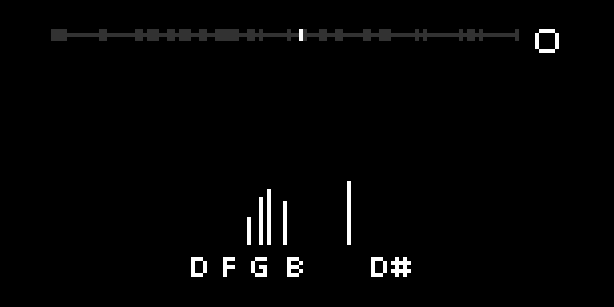
MIDI notes are displayed as note names and vertical bars. Recording captures both the MIDI notes and the audio. Then you can scroll back to see those notes, and replay what you've recorded. Non-note MIDI data is not captured or visualised.
- K2 = play/stop
- K2 long press = record
- E2 = scroll through time
- E3 = change size of recording window
When you start recording, notes and audio are recorded into a rolling window. For example, if the rolling window is 10 seconds then (only) the last 10 seconds will be retained. If you change the size of the rolling window then that change will only come into effect when you next start recording.
You can also change the size of the rolling record window in
PARAMETERS > EDIT, which also offers a save option. If you do save it
there then this will be its value the next time you load the script.
Requirements
You will need a MIDI device connected to the norns. If you also connect audio then midi review will record the audio along with the MIDI notes.
Running the tests
cd lib
lua test_all.lua
Credits
Thanks to:
- @tehn for creating norns and the amazing software development environment.
- @zebra for creating softcut, which manages all the audio.
- @markeats for creating musicutil, which translates MIDI to note names.
discussion
Like this script? React with 👍 or ❤️ below (needs a GitHub account). Reactions count as likes (♥) on splines, updated daily.