 splines
scripts / norns
midarto
two-deck MIDI file DJ: mix .mid files with a crossfader to General MIDI modules or nb voices, with a full 16x8 grid controller
install
In maiden's REPL (the >> prompt at the bottom of the editor), run:
;install https://github.com/mrglennjones/midartoOr add the splines catalog to maiden and install it from the project manager. Restart norns if the script ships a new engine.
readme from mrglennjones/midarto
Midarto
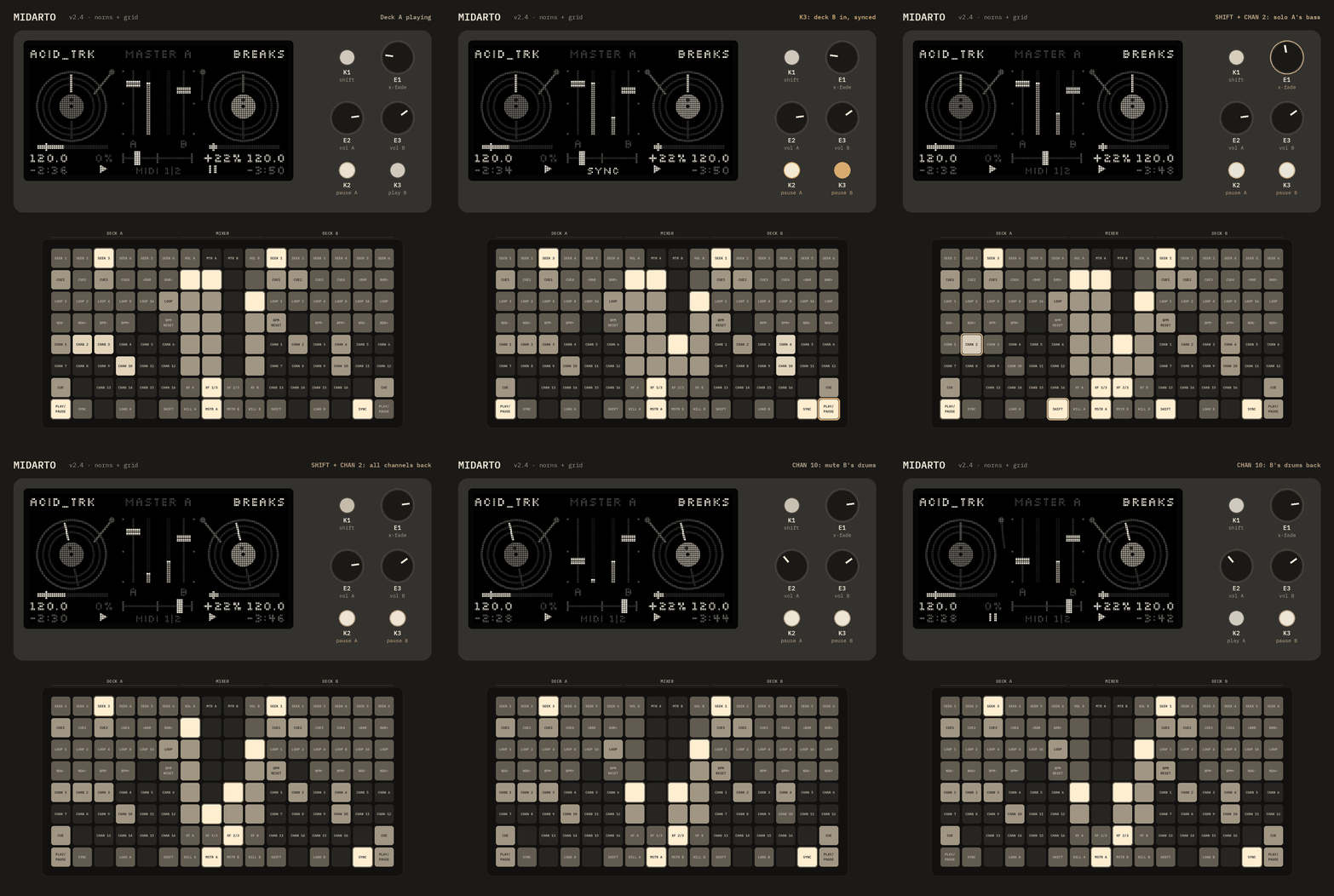
A two-deck MIDI file DJ for monome norns. Load .mid files into deck A and deck B, mix them with a crossfader and play them out to a MIDI sound module (such as a General MIDI module) or to nb voices. It works on the norns alone, and a 16×8 grid adds cues, loops, mutes, sync and transport keys.
Version 2.15.
Install
From maiden (once the repo is public): in the maiden REPL, type ;install https://github.com/mrglennjones/midarto.
By copying:
- Unzip
midarto.zip. You get a folder calledmidartocontainingmidarto.lua,lib/,demo/and this README. - Copy the whole
midartofolder intodust/code/on your norns. Any of these works:- From a computer on the same network, open the norns file share (
smb://norns.localon macOS or\\norns.localon Windows, userwe, passwordsleepunless you changed it). Drop the folder intodust/code/. - Or from a terminal:
scp -r midarto we@norns.local:~/dust/code/
- From a computer on the same network, open the norns file share (
- On the norns, go to SELECT and choose MIDARTO. A 5-second splash screen shows an 8-bit DJ at the decks next to the title, then the credits, while "MIDARTO" scrolls across the grid; press any key or knob, or any grid key, to skip it.
The first time it runs, Midarto creates a songs folder, dust/data/midarto/songs/, and puts two demo songs in it (acid_trk.mid at 120 BPM and breaks.mid at 98.5 BPM), so you can try it straight away.
Your own files
Fill the songs folder, dust/data/midarto/songs/, with your own .mid or .midi files. Subfolders are fine, for example one per set or genre. The browser always opens in the songs folder, and you can go up to browse anywhere in dust. You can delete the demo songs once you've added your own; if the folder is ever empty, Midarto puts them back.
Upgrading from v2.4 or earlier: songs you kept directly in dust/data/midarto/ are moved into the songs folder the first time v2.5 runs.
Optional: nb voices
To play a deck through nb voices instead of MIDI, install the nb library (dust/code/nb) plus any nb voice mods you want, then restart Midarto. An "nb voice" output option and a voice selector then appear in each deck's parameters. If nb isn't installed, Midarto simply offers MIDI output only.
First setup
Open PARAMS > EDIT > MIDARTO. Midarto saves these settings a couple of seconds after you change them (in dust/data/midarto/settings.pset), so they survive a power cut, and keeps them when you update to a new version. If an update needs to adjust an old setting, it does so once and shows what it changed.
| Parameter | What it does |
|---|---|
| midi outputs | one device (default): both decks play to deck A's MIDI device. two devices: each deck has its own device |
| output | midi or nb voice (nb only if installed) |
| midi device | Which MIDI port the deck plays to (1–16, names shown). With one device, only deck A's shows and both decks use it. With two, deck B defaults to port 2 |
| channel shift | Moves the file's channels up by this amount, so two decks don't fight over the same channels. Deck A defaults to 0, deck B to 8 |
| drums stay on 10 | Keeps channel 10 drums on 10 when shifting; other channels skip 10 |
| nb voice | Voice for the deck when output is nb voice |
| crossfader curve | dj (both full at the centre) or smooth (constant power) |
| cue to first note | first note (default), first drum or off. On load, hot cue 1 and the deck go to the start of the bar where the music begins, skipping silence at the start |
| start on bar | on + sync (default), on or off. PLAY on a stopped deck waits for the other deck's next bar line while it plays; on + sync also locks the tempo |
| quantize jumps | Seek, cue and bar jumps wait for the next bar line |
| knob sensitivity | How far the faders move per encoder step |
| end warning | How long before the end of a song it warns you (platter outline or waveform header flashes): off, 10, 20, 30 (default) or 60 seconds |
| clock follows master | Sets the norns clock tempo from the master deck, so clocked gear follows |
| panic | All notes off on both decks' outputs |
| screen view | platters (default) or waveform |
| waveform zoom | How much time the waveform shows across the screen: 2, 4 (default), 8, 16 or 32 seconds |
| show frame time | Shows how long each screen frame takes to draw, for checking the load on your norns |
| keep screen awake | while playing (default), always or off. Stops the norns blanking its screen after 15 minutes without a key or knob press |
| clear song cache | Deletes the song library's cached data (cue points are kept) |
One General MIDI module (the default): plug your GM module into the norns and set deck A's midi device to it. Deck B plays to the same device automatically.
General MIDI has only 16 channels, so deck B's channel shift (8 by default) moves its parts out of deck A's way. For example, deck B's channels 1–7 play on 9 and 11–16 (10 is skipped), while deck A keeps 1–8. Both decks share drums on channel 10, because General MIDI has only one drum channel. Files that use more than 8 channels will still overlap. Shared channels are handled for you: see "Shared channels" below.
Two General MIDI modules: give each deck its own module, so nothing collides and both files keep all 16 channels, drums included.
- Plug both USB MIDI modules (or USB MIDI interfaces) into the norns.
- Go to SYSTEM > DEVICES > MIDI and check which port each one is on.
- In PARAMS > EDIT > MIDARTO, set midi outputs to
two devices. Deck B's midi device setting appears. - Set deck A's midi device to the first module and deck B's to the second. The device names show next to the numbers.
- Set deck B's channel shift to 0.
Upgrading from v2.3–v2.7: from 2.14 on, Midarto fixes deck B's old channel shift (0) for you on the first run and shows "B shift 8".
Waveform view
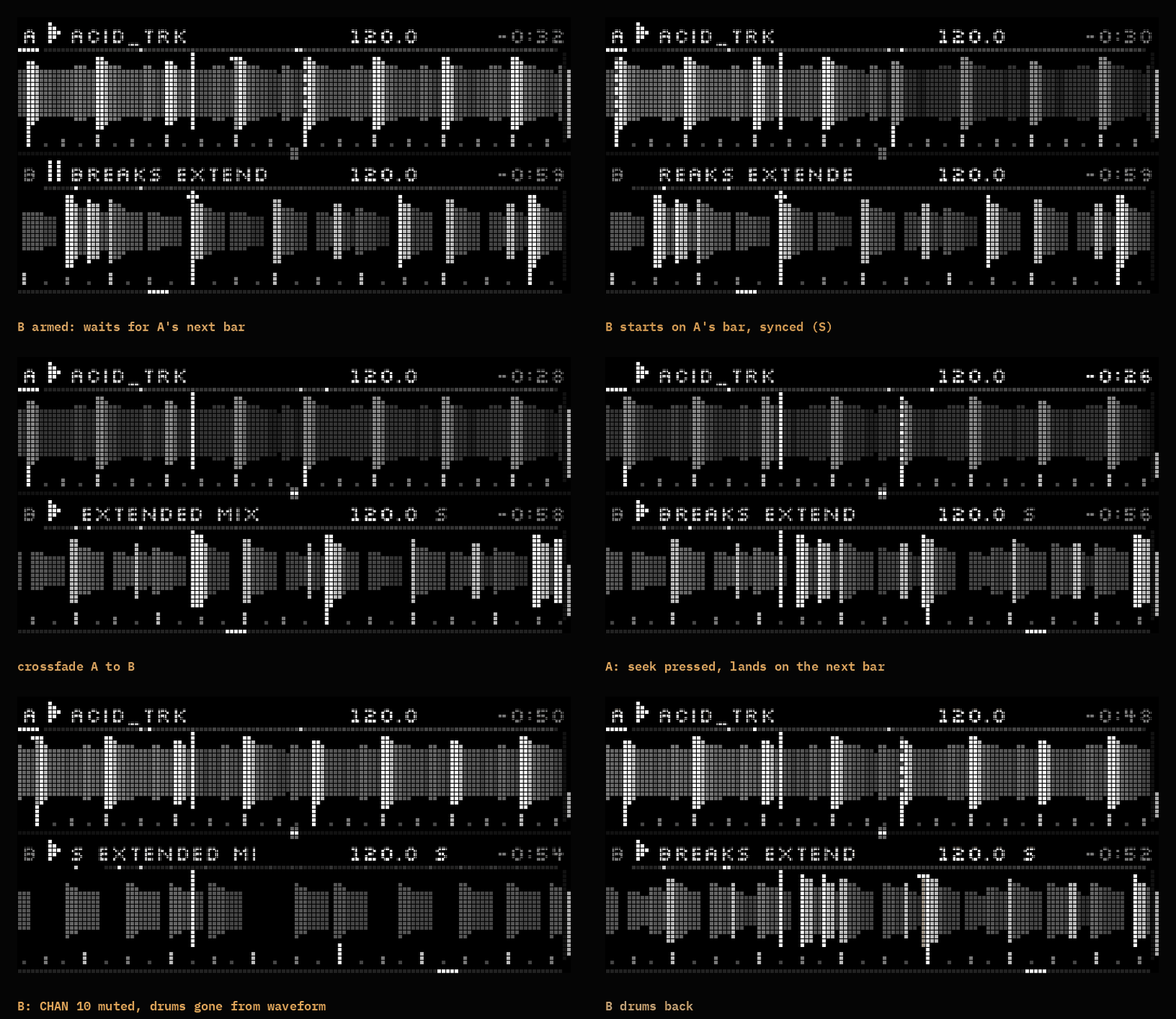
Set screen view to waveform in PARAMS. Each deck gets half the screen (A on top, B below):
- Header: deck letter (bright with a bar under it on the master deck), play/pause (blinking while armed for start on bar), the scrolling song name, BPM (shows the tempo change for a second when you change it), a blinking
Swhen synced, and time remaining. - Overview strip: a thin line showing the whole song, with the loop, hot cues and your position. A pending jump's target blinks.
- Waveform: the song's MIDI activity scrolling past a fixed playhead. Height shows how busy the music you can hear is; kicks punch out as tall bright spikes and snares/claps as shorter light-grey ones (songs without drums use bass-note starts). Upcoming music is slightly dimmer, and the end-warning stretch is darker. Muted or solo-silenced channels disappear from it.
- Markers: hot cues as lines, a dashed line where a pending jump will land, and a beat ruler (phrases every 8 bars, bars, beats, half and quarter beats).
- Right edge: each deck's output level.
- Middle line: a beat-phase meter. The marker sits on the centre mark when both decks' beats line up.
- Bottom edge: the crossfader.
The waveform is a picture of the MIDI notes, not the sound from your GM module, but it shows beats, drops and breakdowns clearly. It's worked out when a song loads and saved in the song library.
Song library
Midarto keeps a small library in dust/data/midarto/library/:
- Cue points: hot cues 1–4 and the last loop length for each song are remembered and come back when you load the song again.
- Cache: the prepared song and its waveform, so loading a song the second time is much quicker. If you edit or replace a MIDI file, Midarto notices and rebuilds it, keeping your cue points if they still fit the song.
Everything in the library is safe to delete. clear song cache in PARAMS removes the cached data but keeps your cue points.
Norns controls
| Control | Normal | Hold K1 |
|---|---|---|
| E1 | Crossfader | Tempo of both decks |
| E2 | Deck A volume | Deck A tempo (0.1% steps) |
| E3 | Deck B volume | Deck B tempo |
| K2 | Deck A play/pause | Open file browser for deck A |
| K3 | Deck B play/pause | Open file browser for deck B |
A quick tap on K1 still opens the norns menu, as usual.
In the browser: E2 scrolls, E3 scrolls a page, E1 switches the target deck, K3 opens a folder or loads the file, and K2 closes the browser. The other deck keeps playing while you browse.
On screen: each deck shows its file name (long names scroll), a platter outline that flashes as the song runs out, a platter that turns once per bar, a progress bar (with a hot cue 1 mark and the loop region), BPM, tempo offset and time remaining. The mixer in the middle shows both volume faders, output meters and the crossfader. An X under a fader means that deck is killed.
Grid (16×8)
Deck A is on columns 1–6, the mixer on 7–10 and deck B on 11–16. Rows 1–3, 5 and 6 run in the same order on both decks. Row 4 (tempo) and rows 7–8 are mirrored, so NDG, CUE, PLAY/PAUSE and SYNC sit on the outer edges; −/+ pairs still read left to right.
| Row | Deck A x1–x6 | Mixer x7–x10 | Deck B x11–x16 |
|---|---|---|---|
| 1 | SEEK 1–6 | VOL A · MTR A · MTR B · VOL B | SEEK 1–6 |
| 2 | CUE1–4, <BAR, BAR> | volume and meters | CUE1–4, <BAR, BAR> |
| 3 | LOOP 1, 2, 4, 8, 16, LOOP | volume and meters | LOOP 1, 2, 4, 8, 16, LOOP |
| 4 | NDG−, NDG+, BPM−, BPM+, free, BPM RESET | volume and meters | BPM RESET, free, BPM−, BPM+, NDG−, NDG+ |
| 5 | CHAN 1–6 | volume and meters | CHAN 1–6 |
| 6 | CHAN 7–12 | volume and meters | CHAN 7–12 |
| 7 | CUE, free, CHAN 13–16 | XF A · XF 1/3 · XF 2/3 · XF B | CHAN 13–16, free, CUE |
| 8 | PLAY/PAUSE, SYNC, free, LOAD A, free, SHIFT | KILL A · MSTR A · MSTR B · KILL B | SHIFT, free, LOAD B, free, SYNC, PLAY/PAUSE |
Deck keys:
- SEEK 1–6 jumps to that sixth of the file.
- CUE1–4 (hot cues): press an empty one to store the current bar, press a stored one to jump there. SHIFT + hot cue erases it.
- <BAR / BAR> jump back or forward one bar.
- LOOP 1–16 loops that many bars from the current bar; press the lit one again to release. LOOP turns the last loop length back on or off.
- NDG− / NDG+ nudge slower or faster (4%) while held.
- BPM− / BPM+ change tempo by 0.5%. With SHIFT they transpose by a semitone (drums are never transposed). BPM RESET returns to the file tempo straight away (and releases SYNC), or resets transpose with SHIFT.
- SYNC (next to PLAY/PAUSE) matches the other deck's tempo, lines up the bar position and keeps following. Press again to release. The master deck never follows.
- CHAN 1–16 mute or unmute that MIDI channel of the file. These are the file's own channel numbers, so CHAN 10 is the drums even with channel shift.
- SHIFT + CHAN solos that channel. SHIFT + more channels adds them to the solo.
- SHIFT + a soloed channel restores all channels (clears solos and mutes).
- A channel the file doesn't use stays dark. Muted or solo-silenced channels are dim, playing channels are medium, soloed channels are bright, and every channel flickers brighter each time it plays a note.
- CUE goes to hot cue 1 (or the start). While the deck is playing it jumps there and keeps playing, on the next bar when quantize jumps is on; while paused it moves there and stays paused. SHIFT + CUE stops the deck and returns to the start.
- PLAY/PAUSE starts or pauses the deck and pulses on each beat. With "start on bar" on and the other deck playing, PLAY arms the deck instead: the key blinks and the deck starts exactly on the other deck's next bar line (synced, with
on + sync). Press PLAY again to cancel. - LOAD opens the browser for that deck; press it again to close the browser without loading anything. SHIFT is shared by both decks; there's one next to the mixer on each side.
- free keys do nothing yet.
Mixer:
- VOL A / VOL B: press a row to set the level (top = 100%).
- MTR A / MTR B show each deck's output after volume, crossfader, kill and mutes. Holding a meter key cuts that deck until you let go.
- XF: press to jump the crossfader. Pressing a lit middle key moves it to the centre.
- KILL mutes a deck's whole output. MSTR sets the tempo master for sync and for "clock follows master".
- Press MSTR A and MSTR B together for panic.
Brightness: dark = nothing there, dim = available (or muted), medium = set or stored, bright = on. A key blinks while its jump waits for the next bar.
How volume works
For MIDI outputs, Midarto sets each channel's volume (CC7) from the file's own volume multiplied by the deck fader, the crossfader and kill. So moving a fader fades held notes too, and each file's own mix balance is kept. For nb voices there's no channel volume, so note velocity is scaled instead, which only affects new notes.
Instruments: when a file never chooses an instrument for a channel, Midarto sets piano (the General MIDI default), so the part doesn't pick up whatever instrument was left on that channel. Channel shift moves each part's instrument with it.
Shared channels: when both decks use the same channel on the same device (always true for drums on channel 10 with one GM device), the playing deck owns it. Loading, cueing or stopping the other deck sends nothing to that channel: no volume, instrument, controller or all-notes-off messages, so the playing deck carries on untouched. When both decks play, the louder one owns the channel and sets its volume and instrument, and the quieter deck's notes there are played at its own level through velocity. So crossfading hands the drums over from one deck to the other.
Notes and limits
- If anything misbehaves, the maiden REPL shows messages starting with
midarto. - Midarto reads MIDI file formats 0 and 1 and follows tempo changes inside the file. Files timed in SMPTE frames play at their real speed but show 60 BPM.
- Bars are taken from the file's first time signature (4/4 if there isn't one).
- Each deck's nb voice plays every channel of the file on that one voice.
- The layout is built for a 16×8 grid. Other sizes are not supported yet.
Repository layout
midarto.lua,lib/,demo/: the norns script (this folder is what goes indust/code/midarto).docs/midarto-guide.pdf: the full user guide (download).docs/images/: screen, grid and splash images.CHANGELOG.md: what changed in each version.LICENSE: the MIT License.
Thanks
- monome (brian crabtree and the norns contributors) for norns, maiden and the grid.
- sixolet for nb (nota bene), which Midarto can play through.
- sonoCircuit for midiplayer, which showed MIDI file playback on norns and inspired Midarto.
- adamstaff for turntable, whose norns DJ controls inspired Midarto's keys and knobs.
- denki oto for the norns Shield XL and the grid clone that Midarto was developed and tested on.
The guide uses IBM Plex Mono and the mockup images use Silkscreen, both under the SIL Open Font License.
Licence
Midarto is released under the MIT License. You're free to use, change and share it, as long as the copyright notice stays with it.
Credits
Created by Glenn Jones, Cutie Suzuki & DJ FingaBlasta.
- Email: mailmrg@gmail.com
- Social: @mrglennjones
- GitHub: github.com/mrglennjones
- Project: github.com/mrglennjones/midarto
- Discussion: lines forum thread