 splines
← all scripts / norns
media new
Loop on a medium of choice, quantized or freeform.
install
In maiden's REPL (the >> prompt at the bottom of the editor), run:
;install https://github.com/notrobintaylor/mediaOr add the splines catalog to maiden and install it from the project manager. Restart norns if the script ships a new engine.
readme from notrobintaylor/media
media
A medium looper for Monome Norns
media is a standalone Norns looper generated from princeton, sharing its looper code. It carries princeton's looper twice: Looper A with the analog media and Looper B with the digital ones, each with Imprint and Wear and the four playback and four direction modes, and the Mod Rack (eight LFOs, two Sense envelope followers, four Triggers), without the amp, pedalboard, tuner, and metronome. The loop runs on the global Norns clock. The live input is heard through the Norns input monitor; the engine outputs the loop only, and both are summed at the hardware output.
What it does
The looper is the whole script. Six storage media (BBD, Cassette, CD, Chip, Tape, Vinyl) colour the loop. Imprint sets how much of that colour gets baked in the moment you record; Wear sets how much further the loop erodes on every pass. Four playback modes (Overdub, Overwrite, Sample, Resample) and four direction modes (Forward, Reverse, Pendulum, Random) sit underneath. Two loopers run side by side. Looper A carries the analog media (BBD, Cassette, Tape, Vinyl), Looper B the digital ones (CD, Chip); both play at once, each with its own length, speed and medium. Looper B can record the live input, Looper A's output, or both, so a loop can be copied into a second, differently ageing medium. Linked, Looper B follows Looper A's transport: one press records, plays and clears both, and the two loops start on the same sample and stay locked. The Mod Rack drives any parameter of either looper from LFOs, the two input-following Sense modules, and rhythmic Triggers. Two Norns send buses tap the signal for an external fx mod.
Signal flow
  guitar IN L/R ─┬─► Norns input monitor ────────────────► OUT L/R
                 │                                           ▲
                 └─► media engine ─┬─► Looper A ─────┬───────┤
                                   │                 │       │
                                   └─► B Input ◄─────┘       │
                                         │                   │
                                         └─► Looper B ───────┘

  B Input picks what Looper B records: Live / Looper A / Live + Looper A

  Send A and Send B each tap one of four points, scaled by its own level:
    Input     the raw live input
    Looper A  Looper A's output on its own
    Looper B  Looper B's output on its own
    Output    the full audible mix (input + both loops)
The live input never passes through the engine: Norns monitors it straight to the output, in parallel with the engine's loop output. media therefore has no single internal output signal, so the Output send source is reconstructed inside the engine as input plus both loops. Both loopers always reach the output; B Input only decides what Looper B records.
Controls
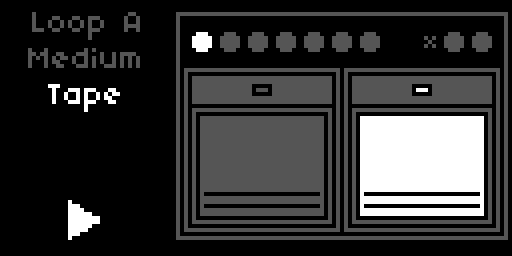
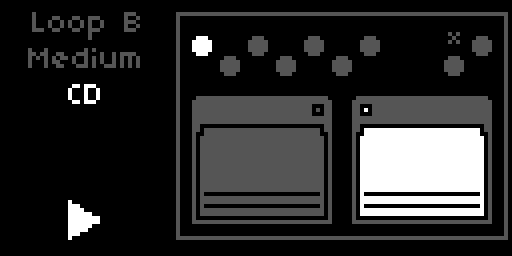
media has two views, toggled by holding K1. The Looper view shows the looper sprite; the Mod Rack view shows the LFO, Sense, Walk, and Trigger panes.
| Control | Function |
|---|---|
| E1 | Looper view: select Looper A or Looper B. Mod Rack view: move between rack panes (Sense / LFOs / Walks / Triggers) |
| E2 | Looper view: select looper parameter. Mod Rack view: scroll the focused source's parameter strip |
| E3 | Change the selected value |
| K1 hold 2s | Toggle between the Looper view and the Mod Rack view |
| K2 | Looper view: stop → clear. Mod Rack view: randomise the focused LFO's register, or a Walk's steps |
| K3 | Looper view: record → play → dub → play. Mod Rack view: toggle the focused source on or off |
In the Looper view, E1 picks Looper A or Looper B; the two panes are told apart by their sprites, and E2, E3, K2 and K3 act on the one shown. E2 scrolls the nine strip parameters (Medium, Wear, Direction, Rec / Play / Fade Level, Speed, Quantize, Quantize Feel) and E3 changes the selected one. A small Quant LED in the panel pulses on every Quant subdivision when the Norns clock is running. K2 and K3 keep their transport behaviour here, so you can punch a loop in or out without leaving the sprite.
In the Mod Rack view, E1 moves between panes: the first pair shows Sense 1 and Sense 2; the next four pairs show LFO 1/2, 3/4, 5/6, and 7/8; one pair shows Walk 1 and Walk 2; the final two pairs show Trigger 1/2 and Trigger 3/4. E2 scrolls the parameter strip for the focused half; E3 changes the value. Short-press K2 on an LFO pane randomises the focused LFO's Stepped Random register, and on a Walk pane rolls fresh values into its steps. Short-press K3 toggles the focused source on or off. The key holds (K2, K3) do nothing here; K1 hold returns to the Looper view.
Parameters
Parameters are listed in PARAMS menu order, under the ─── MEDIA ─── header. The full script list is grouped: SIGNAL FLOW, LOOPER A, LOOPER B, LOOPER B ROUTING, then the Mod Rack groups (MOD SENSE, MOD LFO, MOD WALK, MOD TRIGGER).
Signal Flow
| Parameter | Default | Range / Options |
|---|---|---|
| Send A Source | Output | Input / Looper A / Looper B / Output |
| Send A Level | 0 dB | -60 to +10 dB |
| Send B Source | Output | Input / Looper A / Looper B / Output |
| Send B Level | 0 dB | -60 to +10 dB |
Send A and Send B route to the two Norns send buses, which a compatible fx mod can read in its send a or send b slot. Each send picks its source independently: Input is the raw live input, Looper A and Looper B are each looper's output on its own, and Output is the full audible mix (input plus both loops). Level scales the send from -60 dB (effectively off) up to +10 dB. Because the input is tapped at unity rather than at the monitor level you actually hear, Output is a faithful sum of both sources but not a bit-exact copy of what leaves OUT L/R. With both sends at their defaults (Output, 0 dB) each carries the full output at unity.
fx mod. The mod is optional, and media adapts to whichever version is installed, no patch needed. Without the mod both sends rest and everything else works as usual. media reads the Norns input bus directly, so a send must never land on it: if a send bus of the mod overlaps the Norns input or output (older versions of the mod put ~sendA on the input bus), media gives that send a free bus of its own and points the mod's plugins there while media runs, then hands the original back on exit. Each start writes one line per send to the SuperCollider log in maiden saying where it went.
Looper
Looper A and Looper B have the same parameter set, in the groups LOOPER A and LOOPER B. They differ only in their media: Looper A offers BBD, Cassette, Tape and Vinyl (default Tape), Looper B offers CD and Chip (default CD).
| Parameter | Default | Range / Options |
|---|---|---|
| Step Order | Rec·Play·Dub | Rec·Play·Dub / Rec·Dub·Play |
| Play From | Start | Start / Cue |
| Mode | Overdub | Overdub / Overwrite / Sample / Resample |
| Direction | Forward | Forward / Reverse / Pendulum / Random |
| Rec Level | −2.5 dB | −40–0 dB |
| Play Level | −2.5 dB | −40–0 dB |
| Fade Level | −2.5 dB | −40–0 dB |
| Speed | 0 % | −100–+100 % |
| Speed Control | Steps | Steps / Smooth |
Step Order picks which K2 sequence the looper follows: Rec → Play → Dub → Play … (default) or Rec → Dub → Play …. K3 is unaffected.
Play From controls what happens when playback resumes after a stop. Start always returns to the beginning of the loop. Cue resumes from the position where the loop was stopped.
Mode selects how dub passes interact with the buffer. Overdub layers new material over existing. Overwrite replaces it. Sample stops after one playback pass; K2 retriggers from the Play From position. Resample records the loop output back into the buffer including the medium's degradation chain.
Looper B Routing
| Parameter | Default | Range / Options |
|---|---|---|
| B Input | Live | Live / Looper A / Live + Looper A |
| B Transport | Own | Own / Follows A |
B Input chooses what Looper B records. Live records the input, independent of Looper A. Looper A records only Looper A's output, so B holds a second copy of A that ages in a digital medium; pull Looper A's Play Level down to hear only that copy, since A's Play Level is also what it sends into B. Live + Looper A records both. The setting changes only B's input; both loopers always play to the output.
B Transport set to Follows A ties Looper B to Looper A's transport: every record, play, dub, stop and clear on A happens on B at the same moment, whether it comes from K2/K3, a trigger or MIDI. The link runs inside the engine: B starts recording and playing on the same sample as A and takes its loop length from A, so the two loops stay locked for as long as they run. A different Speed on B changes how B records and plays, not how long its loop lasts, and each looper keeps its own medium, Wear and Direction. Switching the link on while A is already running brings B to A's state.
Direction sets the loop playback direction. Forward is conventional. Reverse plays the buffer backwards. Pendulum alternates forward and reverse at each loop boundary. Random flips direction unpredictably at each boundary for generative texture.
Rec Level and Play Level control recording gain (initial pass and overdub) and playback gain independently. Fade Level sets the gain curve at the loop boundary fade.
Speed is bipolar. In Steps mode it snaps to −100 % (half speed, octave down), 0 % (normal), or +100 % (double speed, octave up). In Smooth mode it moves continuously across the full range, exponentially mapped (2 ^ (Speed/100)). Speed affects both record and replay.
Medium
| Parameter | Default | Range / Options |
|---|---|---|
| Medium | Chip | BBD / Cassette / CD / Chip / Tape / Vinyl |
| Imprint | 10 % | 0–100 % |
| Wear | 5 % | 0–100 % |
| M: BBD Tone | Bright | Bright / Dark |
| M: Cassette Wow | 5 % | 0–100 % |
| M: CD Errors | 0 % | 0–100 % |
| M: Chip Crush | 0 % | 0–100 % |
| M: Tape Wow | 5 % | 0–100 % |
| M: Vinyl Noise | 10 % | 0–100 % |
Medium picks the storage type the loop pretends to be, and it works in two layers. Imprint and Wear are destructive: they bake the medium's base character (its filtering and saturation) into the buffer. Imprint controls how strongly that base character colours the signal at the moment of recording: at 0 % the buffer captures your input clean, at 100 % the first repeat already has the medium's full character. Wear controls how much it degrades the loop on each subsequent pass: at 0 % the loop holds its captured state indefinitely, at higher values it erodes a little more every cycle. The M: parameters are the second layer: medium-specific effects that live on the playback side, non-destructive and reversible in real time. They colour the loop on the way out without ever touching the buffer, so you can dial them while a loop plays and they read back instantly. Because each medium is its own internal looper, the Medium is fixed for the life of a loop: choose it before you record. Changing Medium while a loop exists clears that loop and returns the looper to idle; the new medium then applies to your next recording. The six media, with their characteristic flavour:
- BBD. Bandwidth-limited LPF, op-amp bias, tanh saturation, baked in by Imprint and Wear. M: BBD Tone sets the bandwidth (Bright or Dark). It is the one M: parameter that acts on both sides: it bakes the bandwidth as you record and also filters on playback, so you can darken a recorded loop live down to its baked limit, but not brighten past it.
- Cassette. Bandpass with misbias saturation, amplitude crinkle, and a subtle FM artefact, baked in. M: Cassette Wow adds wow and flutter on the playback side, independent of Imprint and Wear.
- CD. The clean medium of the roster: the recording lands almost pristine and only develops a gentle high-frequency rolloff over passes. Its character lives entirely on the playback side: skips that jump the read head to a new buffer position, stutters that lock the head on a 100 ms region for several repetitions, and brief dropouts that mute the loop. M: CD Errors scales the rate of all three together; the rest of the time the loop plays clean.
- Chip. Bit-depth and sample-rate reduction baked in, with the aliasing that comes for free; low-resolution sample-playback in the spirit of ISD voice chips, vintage DAC hardware, and early samplers. M: Chip Crush is an additional live bitcrusher on the playback side, perceptually curved so it bites from roughly a third of the way up.
- Tape. Wide LPF, misbias saturation, compander LPF, and short print-through, baked in. M: Tape Wow adds wow and flutter on the playback side.
- Vinyl. Gentle high-frequency rolloff baked in, plus a pronounced slow read-side pitch wobble (a warped-record warble). M: Vinyl Noise adds live surface noise on the playback side: fine high-frequency crackle over a continuous low dust haze, sparse at low values, dense when turned up.
The two layers sit on different paths. Imprint colours the input as it enters the buffer (a one-shot at record time), Wear reprocesses the buffer's existing content on every loop pass and folds it back in (accumulating over time). Both bake only the medium's base character. The M: parameters never write to the buffer; they are read-path effects applied to the loop on its way out, reversible and live even on a loop recorded minutes ago. The one exception is M: BBD Tone, which sets a bandwidth used on both sides. With Imprint at 0 and Wear at 0, the buffer captures your input clean and holds it indefinitely, and only the selected medium's M: effects colour the playback.
Destructive write paths (base medium character, scaled by Imprint / Wear)

  input  ──► base character (scaled by Imprint) ──► BufWr ──► buffer      (one-shot at record)
  buffer ──BufRd──► base character (scaled by Wear) ──► BufWr ──► buffer  (accumulates per pass)
                                                                    ↺

Non-destructive read path (M: effects, reversible, never write back)

  buffer ──BufRd──► M: wow / crackle / crush / CD errors / BBD tone ──► output → OUT L/R (and the FX sends)
Quantization
| Parameter | Default | Range / Options |
|---|---|---|
| Quantize | Off | Off / 8/1 / 4/1 / 2/1 / 1/1 / 1/2 / 1/4 / 1/8 / 1/16 / 1/32 / 1/64 |
| Quantize Feel | Note | Note / Dotted / Triplet |
When the Norns clock is running and Quantize is set to a division, every K2 transition (record start, record end, play→dub, dub→play, stop) waits for the next beat boundary. Off is free-running. See Synchronization for how the division and feel combine.
Sense
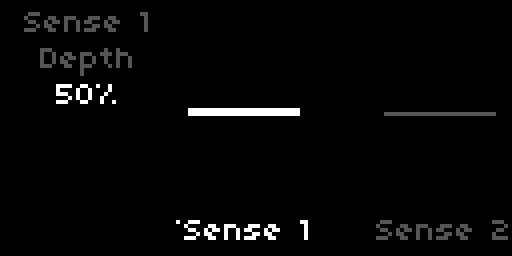
Two envelope followers (the Sense modules), each with the following parameters:
| Parameter | Default | Range / Options |
|---|---|---|
| Enable | Off | Off / On |
| Depth | 50 % | 0–100 % |
| Direction | + | + / − |
| Slew | 50 ms | 1–500 ms |
| Target Device | - | device group |
| Target Param | - | parameter within device |
Each Sense module tracks the amplitude of the live input (left jack). Depth scales the modulation contribution; at 100 % Sense can sweep the target across its full parameter range. Direction picks whether the modulation pushes the target upward from its base value (+) or downward (−). Slew sets the time constant of the amplitude detector itself, with the same value used for both attack and release: short Slew gives snappy, percussive tracking, long Slew gives a sluggish, smooth contour that ignores transients.
Target Device and Target Param select what Sense modulates. The device list and parameter list are the same as the Mod Rack's, minus parameters already claimed by another source. The ownership pool is shared with the Mod Rack: a target can be claimed by at most one LFO or one Sense module at a time, and it is claimed the moment a source points at it, even before that source is enabled. The claimed target's PARAMS entry carries the (M) prefix whether or not the source is running; enabling the source is what starts the value moving. Both Sense modules ship with no target (-); pick a Device and the first free parameter is selected automatically, and setting the Device back to - releases the target.
In the Mod Rack view, each Sense pane shows a live amplitude visualizer with a horizontal centerline. A bar fills upward from the centerline when Direction is +, downward when Direction is −, with its height proportional to the current detected amplitude times Depth. Short-press K3 on the pane to toggle Enable.
Mod Rack
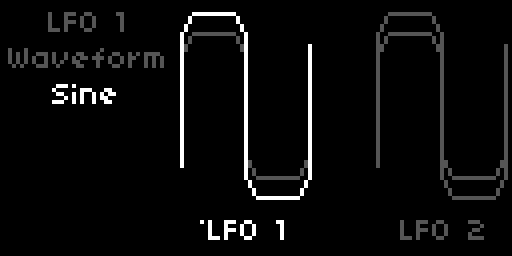
Eight LFOs, each with the following parameters:
| Parameter | Default | Range / Options |
|---|---|---|
| Enable | Off | Off / On |
| Waveform | Sine | Sine / Triangle / Saw / Square / Smooth Random / Stepped Random |
| Rate | 1.0 Hz | 0.1–25 Hz (exp) |
| Depth | 50 % | 0–100 % |
| Direction | +/- | + / - / +/- |
| Phase | 0° | 0° / 90° / 180° / 270° |
| Steps | 8 | 1–16 (Stepped Random only) |
| Stability | 50 % | 0–100 % (Stepped Random only) |
| Sync | Off | Off / 8/1 / 4/1 / 2/1 / 1/1 / 1/2 / 1/4 / 1/8 / 1/16 / 1/32 / 1/64 |
| Sync Feel | Note | Note / Dotted / Triplet (when Sync is active) |
| Rate Slew | 0 s | 0–5 s (non-Step-Random only) |
| Target Device | - | device group |
| Target Param | - | parameter within device |
| Randomize | - | trigger (Stepped Random only, in PARAMS / MAP) |
Enable starts the LFO moving its target. Ownership is claimed earlier, the moment the LFO points at a target: the device and parameter dropdowns filter out parameters already claimed by another LFO or Sense module, so two sources can never share a target. A claimed target's PARAMS entry carries the (M) prefix whether or not its owner is enabled. While the owner is disabled the value sits at its base and still responds to manual edits; while the owner is enabled the modulation drives it. Every source ships with no target (-); pick a Device and the first free parameter is selected automatically, and setting the Device back to - releases the target.
Waveform selects the LFO shape. Sine, Triangle, Saw, and Square are standard periodic waveforms. Smooth Random generates a band-limited random signal that interpolates smoothly between values at each cycle boundary. Stepped Random is a shift-register pattern generator: each clock step shifts the register and inserts a new bit. Steps sets the register length (1–16 bits); Stability controls how often the register feeds back its own most-significant bit (high Stability = more repetition) versus its complement (low Stability = more variation). Randomize is a trigger in PARAMS and MAP that seeds the register; short-press K2 on the LFO's pane triggers the same action.
Rate sets the LFO frequency. When Sync is set to a division, Rate is derived from the Norns clock (see Synchronization), and the Rate strip is replaced with the division name. Sync Feel applies the Note/Dotted/Triplet multiplier and is only visible when Sync is active. Rate Slew smooths abrupt changes to the LFO rate (for example, when another LFO modulates it); hidden for Stepped Random. Direction maps the LFO value to the target range: + sweeps from base to base + depth, - from base to base − depth, +/- symmetrically around the base.
Target Device and Target Param select what the LFO modulates. The device list is Loop A, Loop B, LFO 1–8, and Trigger 1–4. Each looper device exposes its Rec / Play / Fade levels, Speed, Imprint, Wear, the Cassette Wow / CD Errors / Chip Crush / Tape Wow character controls, and the Quantize division and feel. LFOs can target other LFOs' Rate, Depth, Phase, Steps, Stability, Rate Slew, Sync Division and Sync Feel, and the Triggers' Rate, Probability, Sync Division and Sync Feel; routing LFO A into LFO B's rate while LFO B modulates the looper creates compound motion.
The target list adapts to the state of the destination. For another LFO, only the parameters relevant to its current waveform appear: Phase and Rate Slew on the periodic and smooth-random shapes, Steps and Stability on Stepped Random. Rate is hidden once the destination is synced. Sync Division and Sync Feel are exposed as targets only when sync is already active on the destination, so modulation reshapes a sync grid you have already chosen rather than switching sync on or off. A Sync or Quant target can never be moved to Off by modulation; only a manual edit can. If a destination changes in a way that retires the current target, the LFO falls back to the first parameter still available.
Walk
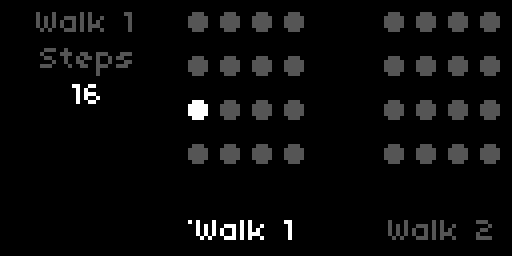
Two step sequencers (the Walk modules), each stepping through up to sixteen values and driving a chosen continuous parameter. Each has the following parameters:
| Parameter | Default | Range / Options |
|---|---|---|
| Enable | Off | Off / On |
| Steps | 16 | 2–16 |
| Step 1 … Step 16 | 0 % | −100 – +100 % |
| Rate | 1.0 Hz | 0.1–25 Hz (exp) |
| Sync | Off | Off / 8/1 / 4/1 / 2/1 / 1/1 / 1/2 / 1/4 / 1/8 / 1/16 / 1/32 / 1/64 |
| Sync Feel | Note | Note / Dotted / Triplet (when Sync is active) |
| Rate Slew | 0 s | 0–5 s |
| Target Device | - | device group |
| Target Param | - | parameter within device |
| Randomize | - | trigger |
A Walk steps through its values in order at Rate, or locked to the Norns clock when Sync is set to a division, looping back to the first step after the last active one. Steps sets how many of the sixteen are used; the rest are skipped, and in the Mod Rack view their knobs simply disappear while the used ones stay in place.
Each step is a bipolar amount from −100 % to +100 %, applied relative to the target parameter's current base value: 0 % leaves the target untouched, +100 % drives it to its maximum, −100 % to its minimum. The scaling is asymmetric by design, so ±100 % always lands exactly on the rail wherever the base sits.
Rate Slew smooths the jump between consecutive step values, gliding instead of hard-stepping. Randomize rolls fresh random values into all active steps; it is a trigger in PARAMS and MAP, and short-press K2 on the Walk's pane does the same.
Target Device and Target Param pick what the Walk drives, from the same pool the LFOs and Sense modules use (the looper parameters plus the mod sources' own controls), minus parameters already claimed by another source. The ownership pool is shared: a target belongs to at most one LFO, Sense or Walk at a time. A Walk can also target another Walk's Rate, Steps, Rate Slew, Sync Division and Sync Feel; the two appear in every source's device list as Walk 1 and Walk 2, and triggers can fire Walk N: Randomize. As with every device, Sync Division and Sync Feel are modulation targets only once the Walk's own Sync is on.
In the Mod Rack view, the Walk pane shows its steps as a grid of knobs. The playing step lights up as a running light; a small dot marks the step selected for editing (E2 scrolls to a step, E3 sets its value). Short-press K3 toggles the Walk on or off.
Triggers
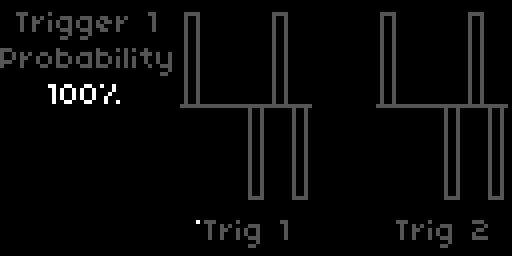
Four event triggers, each with the following parameters:
| Parameter | Default | Range / Options |
|---|---|---|
| Enable | Off | Off / On |
| Probability | 100 % | 0–100 % |
| Rate | 1.0 Hz | 0.1–25 Hz (exp) |
| Sync | Off | Off / 8/1 / 4/1 / 2/1 / 1/1 / 1/2 / 1/4 / 1/8 / 1/16 / 1/32 / 1/64 |
| Sync Feel | Note | Note / Dotted / Triplet |
| Device | - | device group |
| Target | - | action within device |
Triggers fire at a chosen rate and dispatch a single action per fire. Probability acts as a coin gate: 100 % fires every tick, 50 % fires roughly every other, 0 % is silent. Enable activates the trigger; while Off, no clock runs and no action fires. Rate sets the firing frequency in free mode; when Sync is set to a division, Rate is hidden and the rhythm is derived from the Norns clock, with Sync Feel visible alongside.
Device and Target select what the trigger fires. Devices are Loop A, Loop B and LFO 1–8. Each looper device exposes two targets: Rec advances the looper through its transport order (idle → rec → play → dub → play …, with sample-mode retrig in play), and Clear resets the loop unconditionally to idle and empties the buffer. Each LFO device exposes a single Randomize target, available only when that LFO is in Stepped Random waveform; outside Stepped Random the target shows - and the trigger is a no-op.
Triggers guard their targets the same way the LFOs and Sense modules do, but in a pool of their own: no two triggers can fire the same action. The trigger pool is independent of the LFO and Sense pool. When a trigger targets LFO N: Randomize and is enabled, that LFO's internal Stepped Random clock is suspended and the trigger becomes the only source of new random steps. LFOs can modulate trigger Rate and Probability, and, while the trigger is synced, its Sync division and Sync Feel; the trigger devices appear in the LFO target list as Trigger 1 through Trigger 4. Modulating Sync walks a trigger through the clock divisions without leaving the grid: a trigger on Loop A: Rec then cuts loops of changing length that all land on the beat.
Synchronization
media runs on the global Norns clock (PARAMS > CLOCK, internal or MIDI). When the clock is running and a stage's Sync or Quantize parameter is set to a division (anything except Off), its timing derives from the BPM:
- Looper Quantization → snaps K2 transitions to the next beat boundary
- LFO Rate (when Sync is set) → derived from BPM
- Trigger Rate (when Sync is set) → derived from BPM
The conversion is beats = base_beats × feel_multiplier, where:
| Division | base_beats |
|---|---|
8/1 |
32 |
4/1 |
16 |
2/1 |
8 |
1/1 |
4 |
1/2 |
2 |
1/4 |
1 |
1/8 |
0.5 |
1/16 |
0.25 |
1/32 |
0.125 |
1/64 |
0.0625 |
| Feel | feel_multiplier |
|---|---|
| Note | × 1.0 |
| Dotted | × 1.5 |
| Triplet | × 2/3 |
Resulting Hz = BPM / (beats × 60). At 120 BPM: 1/4 Note = 2 Hz, 1/4 Dotted = 1.33 Hz, 1/4 Triplet = 3 Hz. Stopping the clock holds the last derived values.
Looper transport
idle ── K3 ──► rec ── K3 ──► play ── K3 ──► dub ── K3 ──► play …
                │
                └── K2 ──► idle (recording aborted, buffer cleared)

play / dub ── K2 ──► stop ── K2 ──► idle (buffer cleared)
stop ── K3 ──► play
Transport icons at the bottom of the left display (framed in brackets when a looper parameter is selected):
- ● recording
- ●+ overdubbing
- ▶ playing
- ■ stopped
MIDI
Every continuous parameter and every toggle is available in MAP for MIDI control. Assign a CC to a parameter from PARAMS > MAP, or map it directly on the device. Enable toggles use CC ≥ 64 for On and CC < 64 for Off, so a controller must send both values (latch or bi-directional CC). All MIDI input is on channel 1 by default; change it in PARAMS > MIDI.
Install
Via Maiden: open http://norns.local/maiden and run:
;install https://github.com/notrobintaylor/media
Or via SSH:
ssh we@norns.local
cd ~/dust/code
git clone https://github.com/notrobintaylor/media
media is generated from princeton and runs as its own Norns script: it shares the looper, Mod Rack, and DSP modules with princeton, while the host (media.lua, lib/Engine_Media.sc) is media-specific. The FX sends work with any version of the fx mod, see Signal Flow.
discussion
Like this script? React with 👍 or ❤️ below (needs a GitHub account). Reactions count as likes (♥) on splines, updated daily.