 splines
← all scripts / norns
hopscotch
🎹 8-voice MIDI rhythmic arpeggiator for Norns
install
In maiden's REPL (the >> prompt at the bottom of the editor), run:
;install https://github.com/joeygordon/hopscotchOr add the splines catalog to maiden and install it from the project manager. Restart norns if the script ships a new engine.
readme from joeygordon/hopscotch
Hopscotch
8-voice MIDI rhythmic arpeggiator for norns. Chat about it over on lines
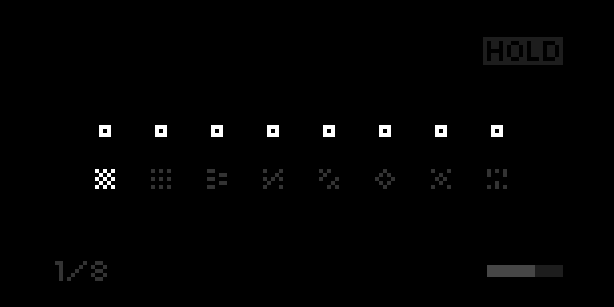
Using Hopscotch
Play some notes with a MIDI input device and Hopscotch will map each note to its own selectable rhythm sequence. There is a 20% chance that the note will play 1 octave higher or lower when it is triggered. The output can be sent to a variety of devices. If using MIDI out, each of the 8 voices can be sent to any MIDI channel. Voices are assigned in the order that they are played, with each new note taking the first available space.
Hardware requirements
- MIDI device to input notes
- A supported output device (see below)
You can choose input and output devices in the params menu.
Currently supported output devices
- MIDI out
- Internal norns out (for now)
- Just Friends via Crow (only supports 6 voices)
Select a Sequence
Use encoder 2 to select which voice you would like to modify. Encoder 3 chooses the sequence.
The ! option assigns a random sequence to that voice whenever a new note is played.
Select a MIDI channel
Note: You must choose MIDI as your output device to see these options
Hold shift (key 1) to swap the sequencer options with MIDI channel options. Select which voice you want to modify with encoder 2, and choose a MIDI channel with encoder 3.
Controls
- K1: shift - change midi channel
- K3: hold on/off
- E2: select a parameter
- E3: adjust parameter
discussion
Like this script? React with 👍 or ❤️ below (needs a GitHub account). Reactions count as likes (♥) on splines, updated daily.