 splines
scripts / norns
duatone
two-voice tone generator for oscilloscope and Lissajous visualization
install
In maiden's REPL (the >> prompt at the bottom of the editor), run:
;install https://github.com/roiyaru-bokujin/DuatoneOr add the splines catalog to maiden and install it from the project manager. Restart norns if the script ships a new engine.
readme from roiyaru-bokujin/duatone
Duatone
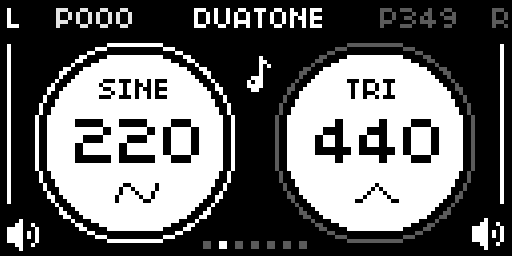
Duatone is a two-voice tone generator for Norns made for shaping Lissajous figures and oscilloscope motion. By default the voices are panned left and right, making it easy to view each waveform separately while dialing in phase and frequency relationships.
Installation
Requires: norns
Install via Maiden or clone/download this repo to:
/home/we/dust/code/duatone
Restart norns after install so SuperCollider picks up Engine_Duatone.sc.
Features
- Two independently shaped voices with per-side frequency, phase, waveform, and volume
- Four waveforms:
sine,square,triangle,saw - Per-side phase modulation with adjustable rate and span limits
- Shared sweep modes:
WRAPandPING-PONG - Seven presets tuned for Lissajous loops, knots, and geometric figures
- Session-local preset editing, with an on-screen marker for changed presets
- A focused screen layout that keeps the active side easy to read while editing
Controls
E1: step through the preset shapesE2: fine-tune the selected side's frequencyE3: change the selected side's waveform- tap
K2: switch the selected side (L/R) - hold
K2+E2: coarse-tune the selected side's frequency - hold
K2+E3: adjust the selected side's volume - tap
K3: toggle phase modulation for the selected side - hold
K3+E2: disable modulation and set a manual phase - hold
K2+K3for one second: restore the current preset to its default values
Parameters
- Levels:
L volume,R volume,global volume - Modulation: active
Preset,phase sweep, per-presetL mod state,L mod rate,R mod state, andR mod rate - Modulation spans:
L mod span min,L mod span max,R mod span min,R mod span max - Stereo placement:
L pan,R pan
By default the voices are hard-panned left and right for oscilloscope viewing and Lissajous shaping. Set both pan controls to 0 for dual-mono output.
Presets
The presets recall waveform, frequency, phase, and phase-modulation relationships for both sides as starting points for different Lissajous knots, loops, and geometric figures. Edits remain attached to each preset while the script is running, so moving between presets with E1 does not discard them.
Changing a preset's parameters marks it as edited with a short line above its preset dot. Changes are kept throughout the current session and reset when the script is reloaded.
Hold K2 + K3 for one second to restore the current preset to its default values.
Volume, pan, modulation spans, and sweep mode remain global performance settings and are not restored by preset resets.

OVAL | FIGURE8 | TREFOIL | TRIKNOT | ORBIT | DRIFT | ROSETTE
Download
Duatone is available via the community catalog on norns.local, or it can be installed manually in maiden:
;install https://github.com/roiyaru-bokujin/Duatone
After installation, restart your norns to enable the new engine.