 splines
← all scripts / norns
awake-ashsynth
Awake dual sequencer with AshSynth — TIE legato, glide, grid
install
In maiden's REPL (the >> prompt at the bottom of the editor), run:
;install https://github.com/nunosmash/awake-ashsynthOr add the splines catalog to maiden and install it from the project manager. Restart norns if the script ships a new engine.
readme from nunosmash/awake-ashsynth
Awake-AshSynth
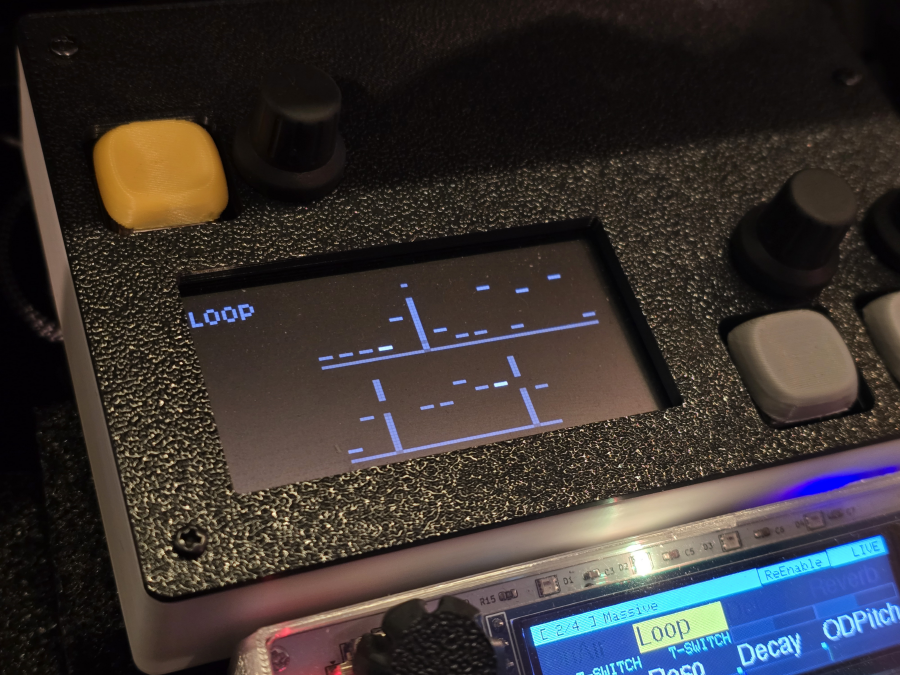
A norns script that pairs the Awake sequencer with the AshSynth engine.
It follows the same sequencing structure as awake-passersby, but uses the Ash engine instead of Passersby.
Overview
Awake uses two overlapping sequencers:
| Layer | Role |
|---|---|
| Top (one) | Melody. Sound only triggers when this layer has a note |
| Bottom (two) | Pitch offset. Added to the top layer to set the final pitch |
final pitch = scale[ one[step] + two[step] ]
A bottom value of 0 is not a rest — it means offset 0. If the top layer has a note, sound still plays even when the bottom is 0.
Requirements
- norns
- ashsynth must also be installed (
ashsynth/lib/Engine_Ash.sc) - The SuperCollider engine file should live in ashsynth only. A separate
Engine_Ash.scinsideawake-ashsynthwill cause duplicate engine errors - Grid (optional): monome grid or toga integration
lib/ash_engine.luaandlib/beatclock-crow.luaare included in this script
Installation
norns/dust/code/awake-ashsynth/   ← this script
norns/dust/code/ashsynth/         ← Ash engine (required)
Engine / Sound
- Engine:
engine.name = "Ash"— same as ashsynth - Parameters:
lib/ash_engine.lua— same Ash parameter set as ashsynth - Differences from ashsynth
- No awake halfsecond (softcut) delay loop — direct engine output
noteOff→noteOneach step to retrigger ADSR (sequencer behavior)- TIE support for legato / glide between steps
- SOUND mode shortcuts: cutoff, reso, drive, reverb, delay, fdbk
Controls
E1 cycles modes: STEP → LOOP → SOUND → OPTION
STEP
| Input | Action |
|---|---|
| E2 | Move edit position |
| E3 | Change note value (current channel: one / two) |
| K2 | Switch one ↔ two channel |
| K2 + K1 hold | Clear entire pattern (including TIE) |
| K3 | Morph (current channel) |
| K3 + K1 hold | Random (resets TIE) |
| K1 hold + E2 | Probability |
LOOP
| Input | Action |
|---|---|
| E2 | Top loop length |
| E3 | Bottom loop length |
| K2 | Reset playhead |
| K2 + K1 hold | Reset clock |
| K3 | Random jump |
SOUND
| Input | Action |
|---|---|
| K2 / K3 | Select parameter pair |
| E2 / E3 | Adjust selected Ash parameters |
Shortcuts: cutoff, reso, drive, reverb, delay, fdbk
OPTION
| Input | Action |
|---|---|
| E2 | BPM |
| E3 | Root note |
| K1 hold + E2 | Step length |
| K1 hold + E3 | Scale |
Grid (toga / monome)
Note editing
- Top 8 rows (or upper half of a 16-row grid):
onepattern - Bottom 8 rows (or lower half of a 16-row grid):
twopattern - Press a step (column) to toggle a note. Press again to delete
On an 8-row grid, use K2 to switch between one / two.
TIE (legato)
Awake retriggers every step (noteOff → noteOn), so every note is the same length and legato glide does not work on its own.
TIE connects one step into the next: the gate stays open, the envelope is not retriggered, and glide can slide pitch across steps.
Default Glide Mode is Legato — glide applies on TIE-connected steps. Raise the glide amount in params or SOUND mode.
How to toggle
- Hold K1
- Press a step column on the grid (the step must already have a note)
- Press again to turn TIE off
Works on top or bottom layer. On a 16-row grid, use the upper half for top TIE and the lower half for bottom TIE.
What TIE does
A TIE on step N means: when the sequencer reaches step N+1, do not cut the note first.
| Layer | Effect |
|---|---|
| Top TIE | Melody degree carries into the next step |
| Bottom TIE | Pitch offset carries into the next step (works even if bottom goes to 0) |
Either layer can trigger legato. Sound still only plays when the top layer has a note.
Visual feedback
| Display | Normal note | TIE step |
|---|---|---|
| Grid | Bright cell at note position | Entire column dim; note cell off |
| norns screen | Horizontal note bar | Dim vertical line; note bar dark |
| Playback | — | Current step highlighted on top of TIE display |
Glide
| Glide Mode | Behavior |
|---|---|
| All | Glide on every step |
| Legato (default) | Glide only on TIE-connected steps |
Without TIE, each step is a fresh attack. With TIE + Legato + glide, pitch slides into the next step.
Examples
Bottom layer glide (common case — top holds, bottom moves):
Top (one):    3   3   3   3
Bottom (two): 2   5   7   0
TIE:              ●       (TIE on step 2 → legs into step 3)

→ pitch glides from scale[3+5] to scale[3+7]
Top layer glide:
Top (one):    2   5   7   4
TIE:          ●   ●
Bottom (two): 0   0   0   0

→ melody glides across tied top steps
TIE is cleared when
- The note on that step is deleted
- K2 + K1 hold clear pattern
- K3 + K1 hold random
TIE state is saved with norns params / presets on your device.
MIDI output
params output: audio / midi / audio + midi / crow, etc.
MIDI Program Change (PC 0–15) can recall saved presets on your norns (dust/data/awake-ashsynth/).
vs. awake-passersby
| awake-passersby | awake-ashsynth | |
|---|---|---|
| Engine | Passersby | Ash (ashsynth) |
| Delay | halfsecond softcut | Engine delay only |
| SOUND shortcuts | filter, resonance, lfo rate, lfo depth, delay, delay fb | cutoff, reso, drive, reverb, delay, fdbk |
| TIE / legato | No | Yes |
| Sequencer / UI / grid | Same | Same |
File structure
awake-ashsynth/
├── awake-ashsynth.lua      # main script
└── lib/
    ├── ash_engine.lua      # Ash params & engine bridge
    └── beatclock-crow.lua  # clock

ashsynth/
├── ashsynth.lua            # main script
└── lib/
    ├── ash_engine.lua      # Ash params & engine bridge
    └── Engine_Ash.sc       # engine
Presets are saved locally on norns under dust/data/awake-ashsynth/ (not included in this repo).
License
This project is licensed under the GNU General Public License v3.0 (GPL-3.0).
See LICENSE for the full text.
Third-party components
| Component | License | Notes |
|---|---|---|
| awake | GPL-3.0 (norns ecosystem) | Sequencer structure & UI |
| awake-passersby | GPL-3.0 | Direct basis for this script |
| passersby | GPL-3.0 | awake-passersby engine reference |
| ashsynth | Apache 2.0 | lib/ash_engine.lua; requires Engine_Ash.sc from ashsynth |
lib/ash_engine.lua is derived from ashsynth (Apache 2.0) and is included in this GPL-3.0 distribution per Apache–GPL compatibility.
Credits
- Awake sequencer: @tehn
- Based on awake-passersby / awake
- Ash engine: ashsynth
discussion
Like this script? React with 👍 or ❤️ below (needs a GitHub account). Reactions count as likes (♥) on splines, updated daily.