 splines
scripts / norns
4-big-knobs
send control voltages out of crow
install
In maiden's REPL (the >> prompt at the bottom of the editor), run:
;install https://github.com/21echoes/4-big-knobsOr add the splines catalog to maiden and install it from the project manager. Restart norns if the script ships a new engine.
readme from 21echoes/4-big-knobs
4 Big Knobs
Send control voltages out of Crow. Intended for use with Arc, where each Arc encoder controls the voltage sent from the corresponding Crow output.
UI
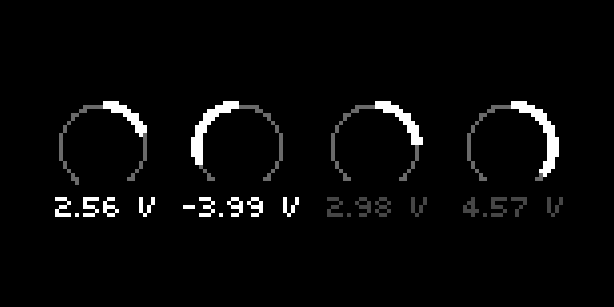
- 4 dials showing current voltage values
- Ships with helper text to help you learn the ropes (disable helper text in params menu)
Controls
Arc (optional)
- Each encoder is mapped to the corresponding dial on screen
Norns
- E1 changes which dials are focused
- E2 & E3 are mapped to the highlighted dials on screen
Snapshot mode
- Switch modes via Params menu. Defaults to Snapshot mode if launched with an Arc connected
- K2 & K3 save current state to one of two snapshot banks
- E1 interpolates between the two snapshots
- If you change a dial while interpolating, an intermediary snapshot is taken.
- Now as you turn E1, you are interpolating between 3 snapshots: snapshot 1 at the leftmost extreme, snapshot 2 at the rightmost extreme, and your intermediary snapshot in between them (located wherever the interpolation was when you changed the dial)
- The intermediary snapshot is reset whenever you take a new real snapshot
Quantize mode
- Switch modes via Params menu
- E2 & E3 select scale root and scale type
- K2: Toggle between continuous quantization and on-demand quantization
- K3: Quantize now!
- Set slew timing for quantization in the Params > Quantization menu
Additional Parameters
- Crow Outputs
- Minimum and Maximum voltage per output
- Slew time per output
- Customize dial -> Crow output mapping
- Direct control over dial values (can be used for MIDI mapping if you'd like a different control surface)
- Crow Inputs
- Each Crow input can exert influence over all the Crow outputs via Attenuation or Offset
- Defaults to Offset
- MIDI Out
- Each dial can send MIDI out, either as CCs or Notes
- Customize which MIDI device and channel is used
- Customize which CC# is sent, along with minimum and maximum CC values
- Misc
- If you have a Norns shield, you can switch top left and right text to match where your E1 is
- You can turn off the helper text once you understand how it works
Requirements
- norns (200712 or later)
- crow (2.0.0 or later)
- arc optional, but encouraged
- use a MIDI device in place of an arc by going into the params menu, clicking “map”, scrolling to “crow outputs”, scroll to “1_volt” and the other 4 options, and map each of them to a different control on the MIDI device
Roadmap
Quantization mode
- More scales (whole volts, 10TET, more?)